Reference of the official specification and author-created Linux sample · Confirmation date September 30, 2026
obsidian:// URI Scheme Complete Guide — All Actions and Pitfalls
This page was machine-translated from Japanese. Read the Japanese original
obsidian:// is a URI for opening, creating, and searching Obsidian notes from another app or launcher. First, select the action that suits the purpose and encode each value URI. The additional text can start with the example of new+append=true, which has been confirmed to be saved this time.
If you want to enter the text and copy the URI, also refer to free URI generator that separates syntax and fixed Linux observations.
This page organizes 7 sections and 38 action-specific parameter entries, combining the 6 actions in the official documentation with a separate section for Hook. It maps these to 58 recorded inputs passed to Obsidian 1.13.7 on Linux. Inputs that produced no result are included so that documented behavior and actual save destinations can be read separately.
and create URL, go to the existing URI generator. For symptoms that do not start or stop shortcuts with iPhone, please proceed to Shortcut Handling Guide. This page is for reference to find out the meaning and input results of the standard URI.
Choose action by purpose
The basic form is as follows. Place the parameter after ? and connect multiple items with &. & in the value is converted to %26 because it is not treated as a demarkation.
obsidian://action?param1=value¶m2=value| Action | Use | Official parameters | The result of this time |
|---|---|---|---|
| open | Vault・Open existing notes・headings/blocks | vault / file / path / prepend / append / paneType | Observe existing files, absolute paths, headings, valid blocks, and 3 types of pane. The effect of the text addition flag has not been confirmed. |
| new | New creation and additional/replacement to existing notes | vault / name / file / path / paneType / content / clipboard / silent / append / overwrite / x-success | Save name/file, add/replace/hide/observe the clipboard. Absolute path creation and return have not been reached. |
| daily | Create and display date notes | Same 11 item as new (official text inheritance regulations) | Daily notes and save folder are required. This time, name/file/path is added to the date note. |
| unique | Create with a unique name such as date and time | vault / paneType / content / clipboard / x-success | Unique note creator and save folder are required. Created/3pane/Observed text saving, return not confirmed. |
| search | Open the search sidebar and search term | vault / query | Observe blanks with words/without matches/word abbreviations. |
| choose-vault | Open Vault Manager | No official enumeration parameters | Observed the actual selection screen (I:M1). |
| hook-get-address | Returns the address of the current note for Hook integration | vault / x-success / x-error | Described in a separate section of the formula. The Hook body is unused, clipboard/no return success. Only the error screen of non-existent Vault is observed. |
choose-vault does not list parameters in the fixed official text. The number of 38 items counts the list of other actions and expands the "same as new" provision of daily as the 11 item. The plug-in Advanced URI (obsidian://adv-uri) is not eligible for this standard specification.
Encode both the # of the body and the # of the heading as a value
The official text explains that the blank should be %20 and the slash should be %2F. In I:N1, which converted the author text mixed with Japanese, line breaks, and # & ? + % / = by value, the saved Markdown matched the input. If you convert the entire URL at once, the separator will also change, so the values of vault, file, and content will be treated individually .
const vault = encodeURIComponent('練習Vault');
const file = encodeURIComponent('ノート/日本語 メモ');
const content = encodeURIComponent('本文 # & ? + % / =\n二行目');
const uri = `obsidian://new?vault=${vault}&file=${file}&content=${content}`;
The above is a code for explaining how to assemble. It does not include the execution of saving to the notebook on the terminal. Practice Vault and replace the save destination with your name.
The second half fell in the input that left the raw #
In I:W1, only the # within content was left unencoded. Only the opening sentence was saved; the rest of the text was absent from the file. This observation is not evidence that Obsidian deleted text on its own. It is the result of input that mixed URI delimiters with values.
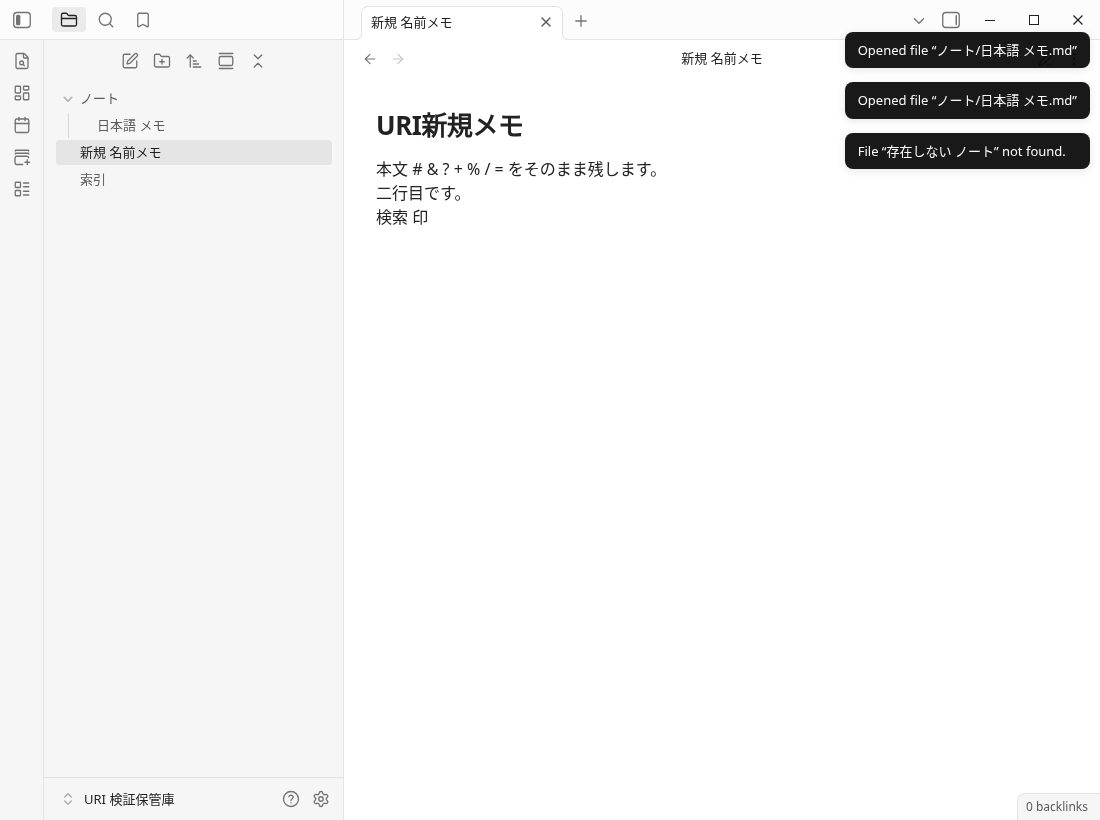
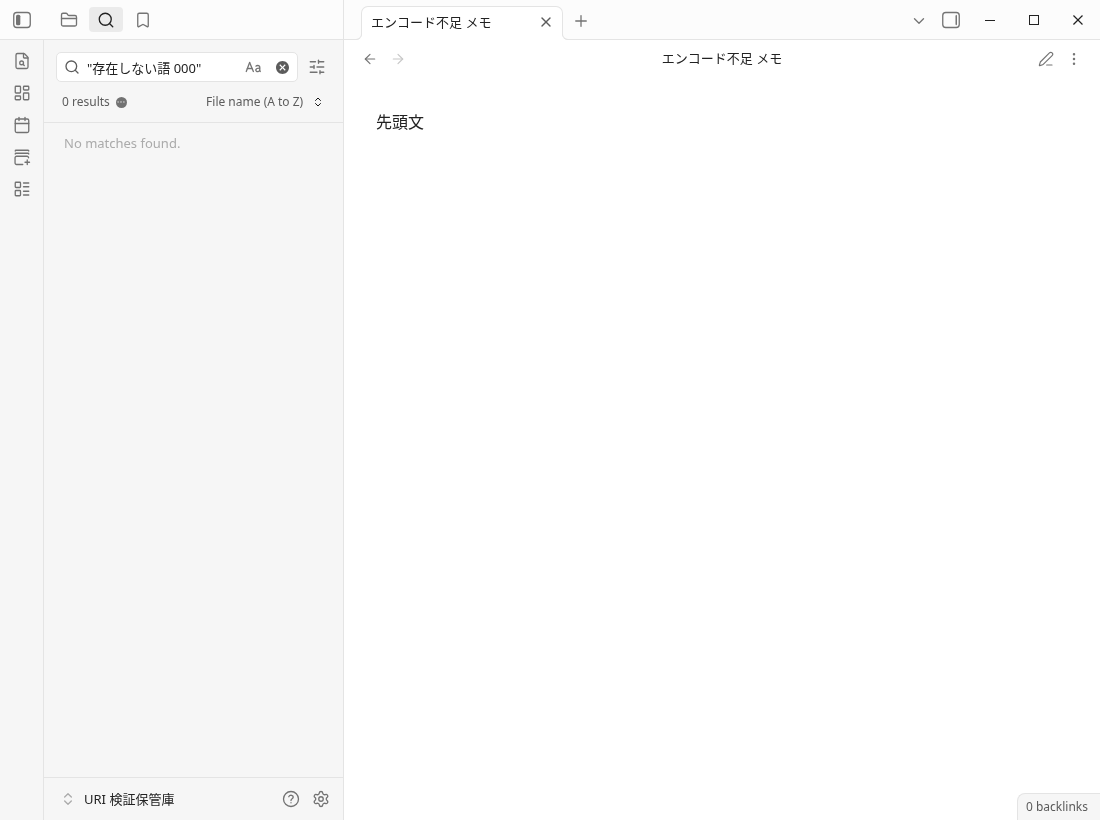
Save the correctly converted input Markdown full text
# URI新規メモ

本文 # & ? + % / = をそのまま残します。
二行目です。
検索 印
Download the original Markdown of I:N1
Save the input that left the raw # Markdown full text
先頭文 Separe new creations, add notes, and overwrites
name of new is the new note name, and the storage destination is left to the "Default location for new notes" of Obsidian. file is a value that includes the storage destination from the Vault route. The official states that file takes precedence over name, and I:N2 also saved it to the file specified destination. In S:N01, only name is stored in a pre-set default folder.
obsidian://new?vault=Practice&file=Inbox%2FURI-test&content=Hello%20WorldIf you want to leave the existing text and add it, pass append=true. I:N3 retained the existing text and added it. overwrite=true is specified to replace the existing text, and there is a separate original text/stored record in I:N5. The official statement says "overwrite only if append is not set", and it was added in both specifications of S:N03. There is no need to mix overwriting specifications with daily text additions.
obsidian://new?vault=Practice&file=Inbox%2FURI-test&content=Another%20line&append=truesilent=true's I:N4 maintained the displayed notes while creating a saved file. clipboard=true's S:C01/C02/C03 saves the author text of the dedicated screen to new/daily/unique. The clipboard text was saved in S:C04, which also passed content at the same time. This set of priority results cannot be extended to all forms of all terminals.
An example of combining text and properties
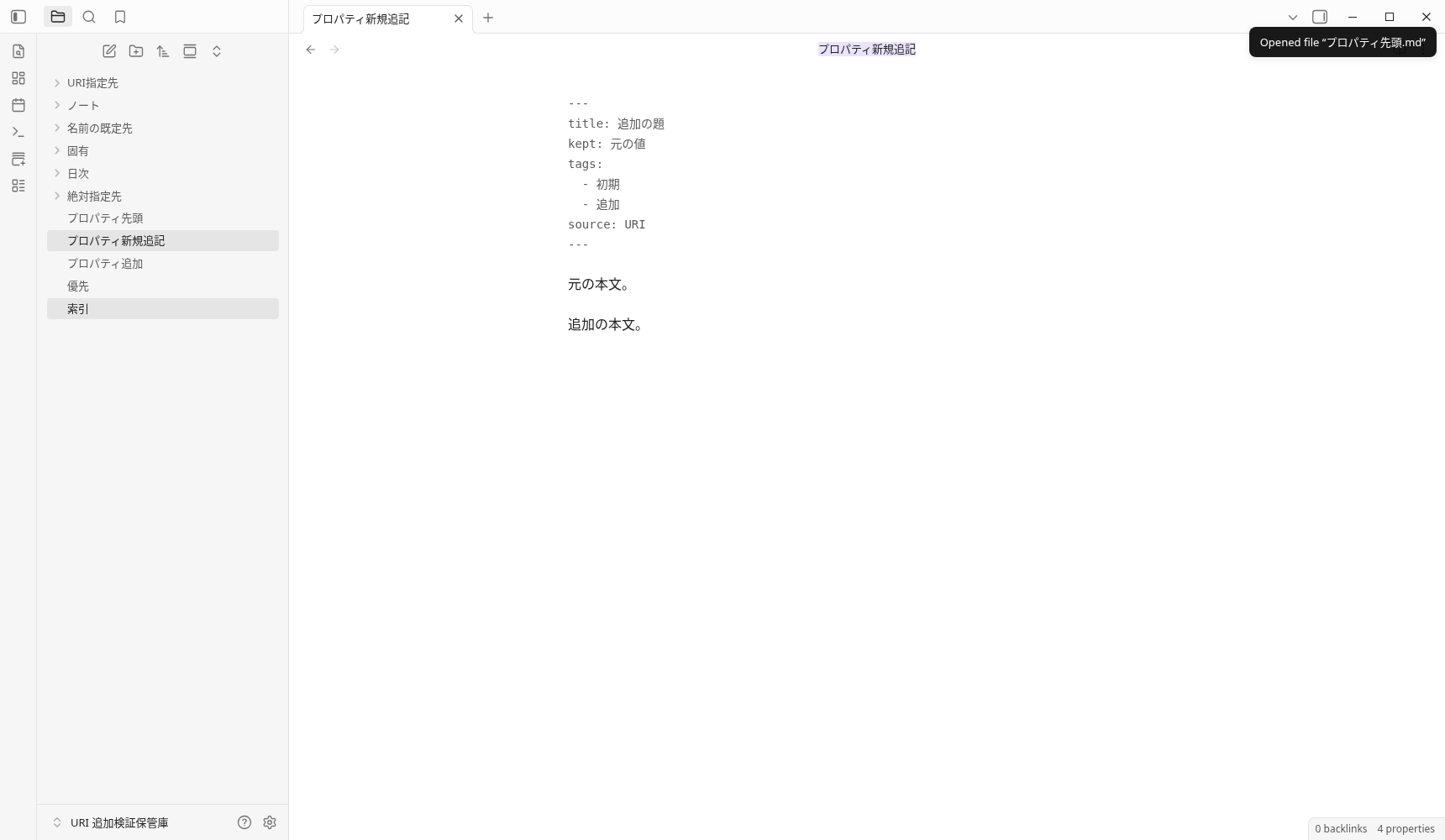
S:M03 passed the documented new, append, and content to the existing author note. In the actual saved file, the title is the value of the added side, the existing kept is retained, the tags contain both, and the body is added to the end. The following is the full text of Markdown saved by 121bytes. I have not tried types, duplicate keys, and complex YAML other than this group.
---
title: 追加の題
kept: 元の値
tags:
  - 初期
  - 追加
source: URI
---

元の本文。

追加の本文。
Download the original Markdown of S:M03
Creating a new absolute path is not included in the success story
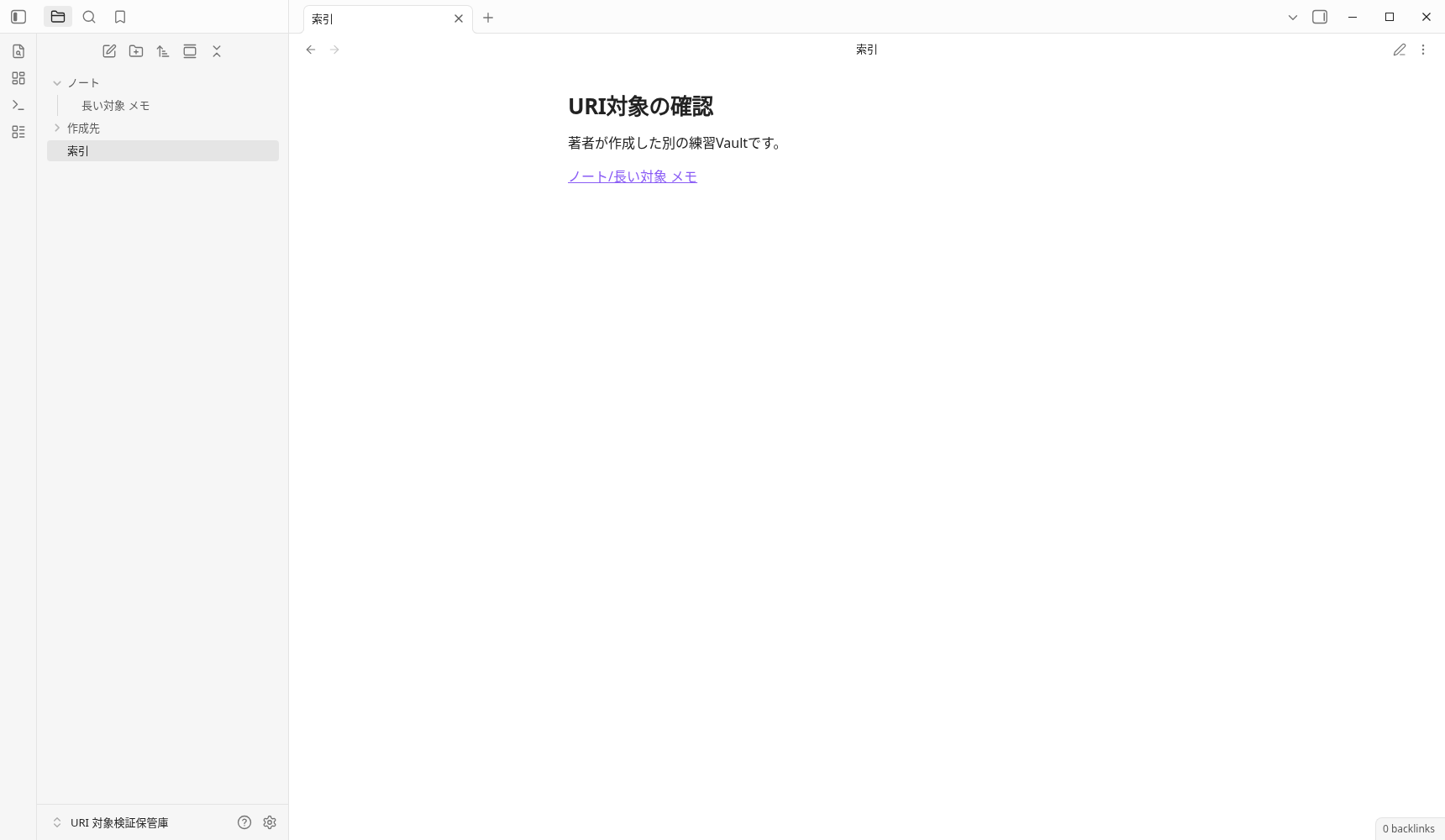
The official new section describes a globally absolute path. S:N02 did not create a file when conflicting vault/name/file parameters were also supplied. A separate trial, T:P1, supplied only path and content for a file that did not yet exist inside the registered author-created Vault. After 6 seconds, the target file still did not exist and the index remained on screen. This records one Linux app invocation path; it does not establish the cause or a defect across all environments.
Go to headings and blocks
For a heading, include ノート名#見出し in the file value; for a block, include ノート名#^block-id, then encode that value. I:O5 confirmed navigation to a heading in the author’s note. Block IDs use only letters, digits and dashes, following the character rules in the archived Internal links documentation.
ノート/長い対象 メモ#^target-01
↓ fileの値をエンコード
%E3%83%8E%E3%83%BC%E3%83%88%2F%E9%95%B7%E3%81%84%E5%AF%BE%E8%B1%A1%20%E3%83%A1%E3%83%A2%23%5Etarget-01
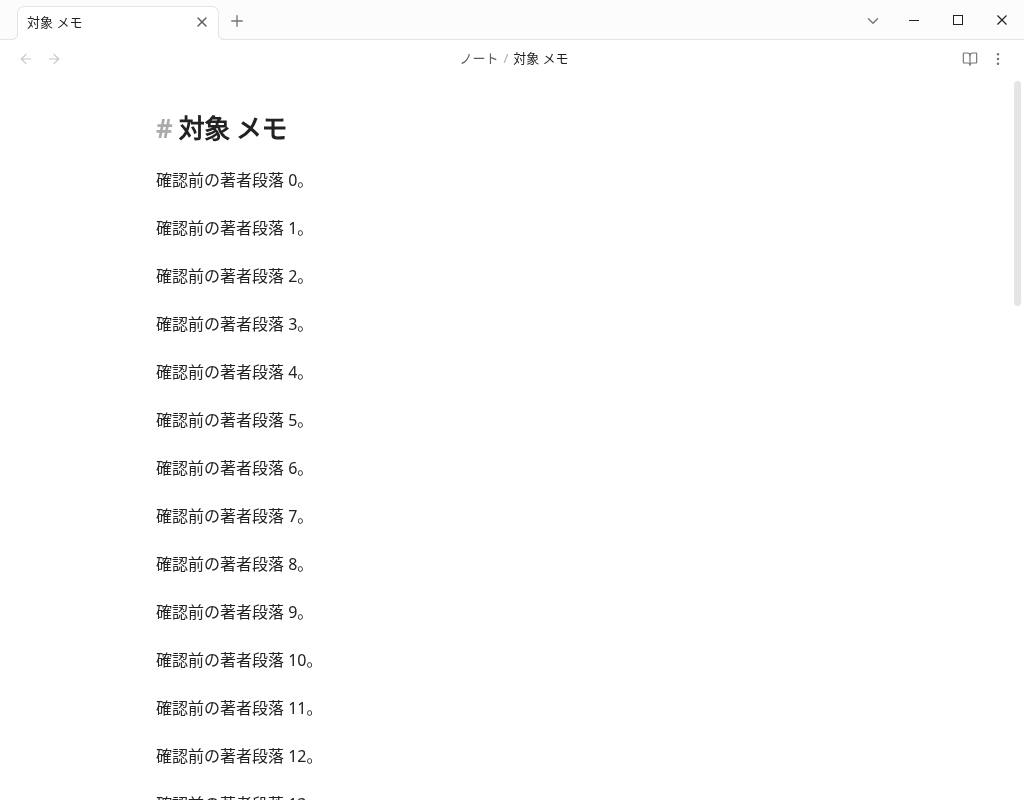
The initial S:O01 used an author-created sample, ^著者block, containing Japanese text. It did not yield valid evidence of the scroll position. We did not count this as a product failure. We added T:B1, using a valid ^target-01 in a long note in a separate Vault. Opening the URI from a separate index note opened the target note and brought the previously off-screen paragraph into view.
In the actual reading, the top of the target paragraph was from 1905.65625px to 467.59375px (display height 1000px), and the scrollTop was 1438. The original 2Markdown is unchanged with bytes and SHA256. The previous position, the standard of another note, and the movement are left on three screens.
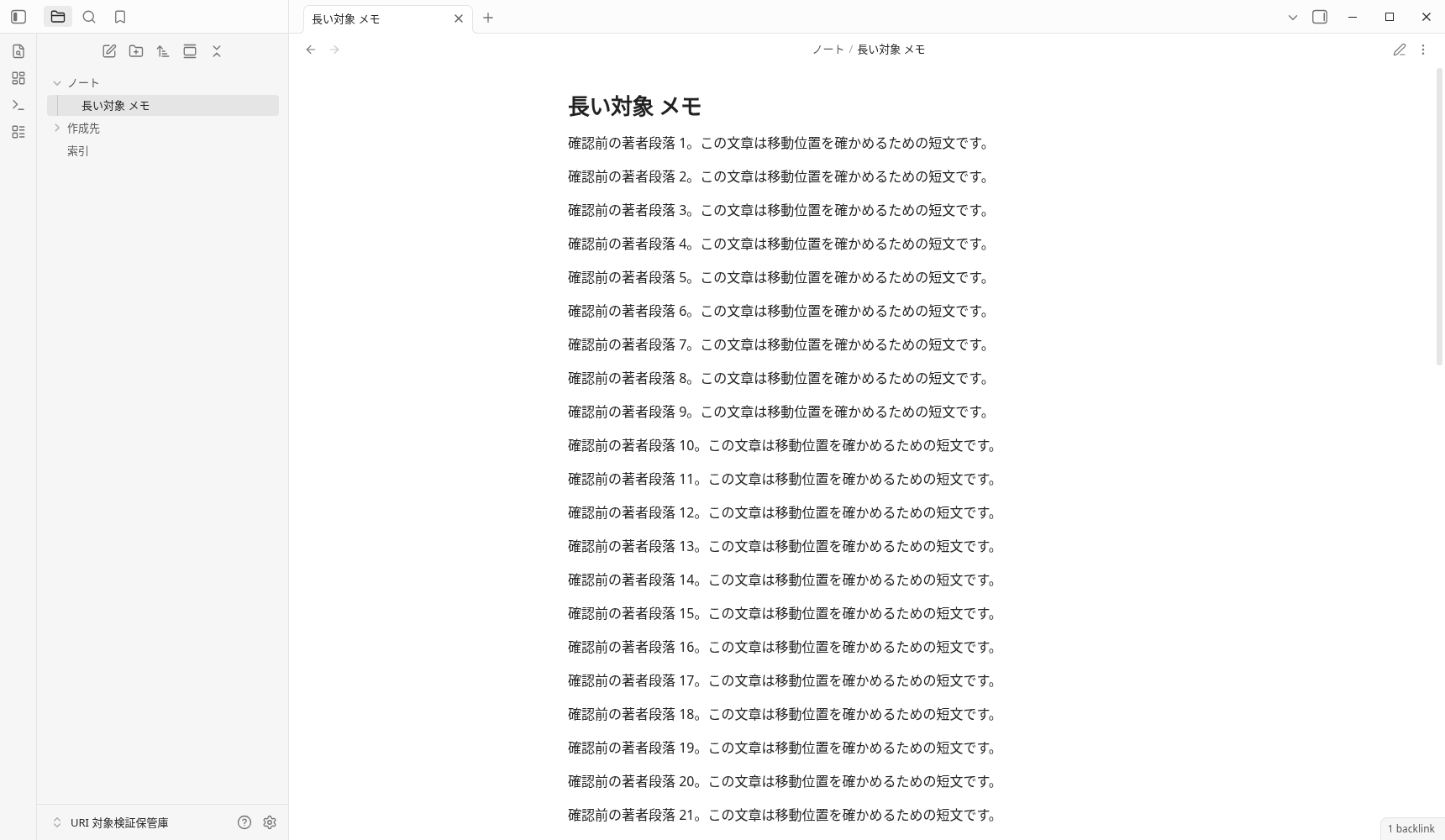
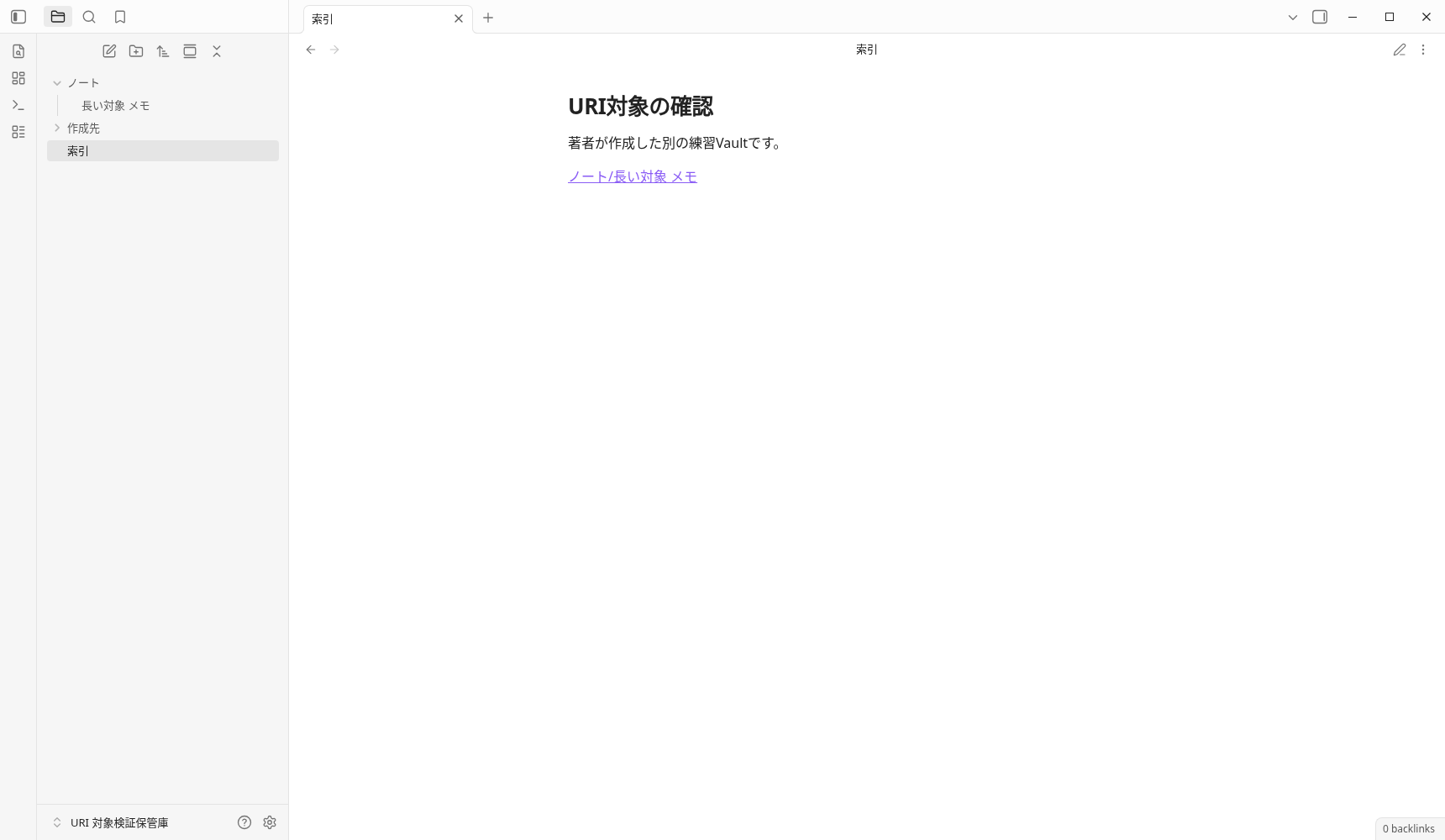
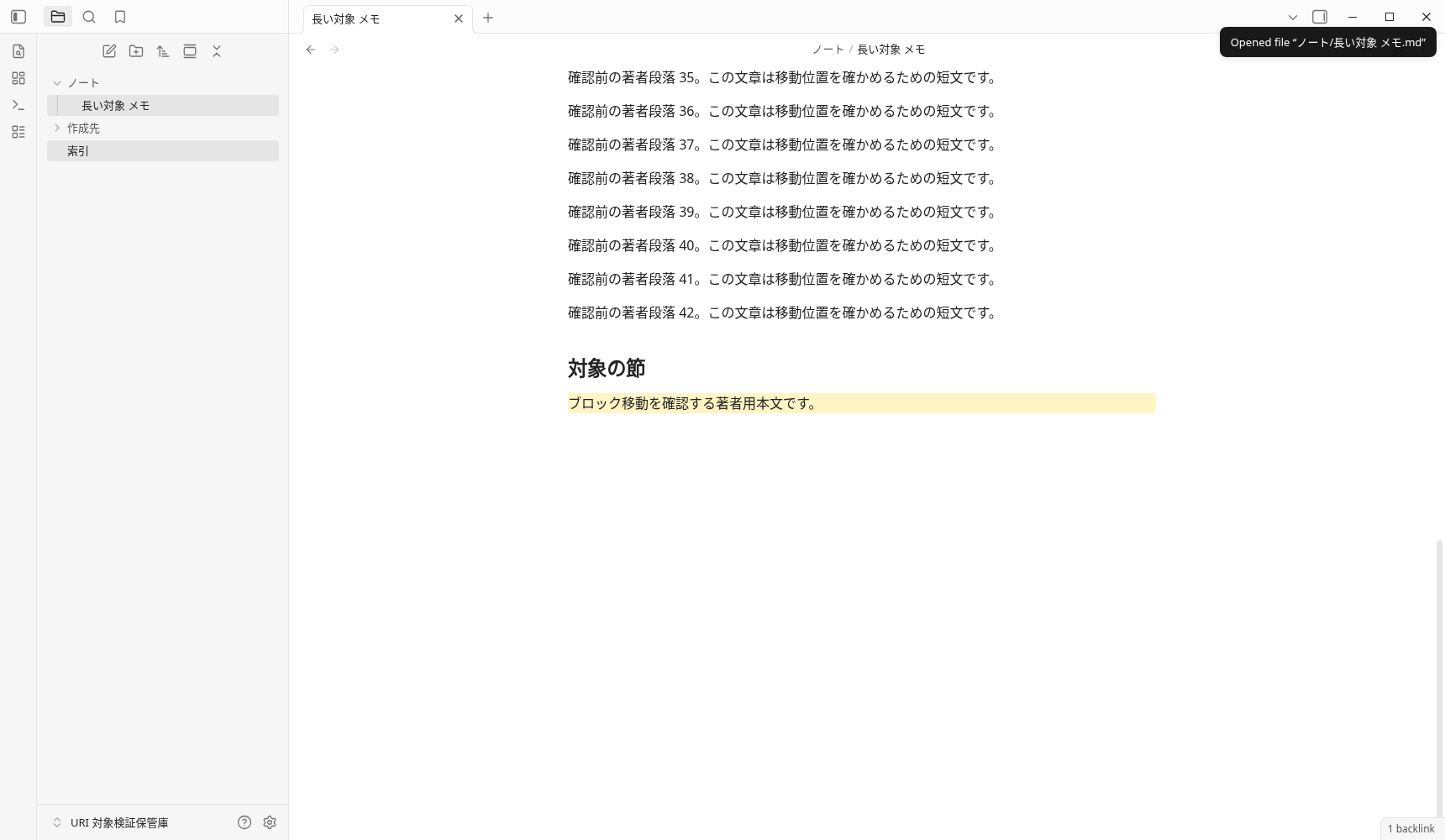
View the full text of the original Markdown where you are moving
# 長い対象 メモ

確認前の著者段落 1。この文章は移動位置を確かめるための短文です。

確認前の著者段落 2。この文章は移動位置を確かめるための短文です。

確認前の著者段落 3。この文章は移動位置を確かめるための短文です。

確認前の著者段落 4。この文章は移動位置を確かめるための短文です。

確認前の著者段落 5。この文章は移動位置を確かめるための短文です。

確認前の著者段落 6。この文章は移動位置を確かめるための短文です。

確認前の著者段落 7。この文章は移動位置を確かめるための短文です。

確認前の著者段落 8。この文章は移動位置を確かめるための短文です。

確認前の著者段落 9。この文章は移動位置を確かめるための短文です。

確認前の著者段落 10。この文章は移動位置を確かめるための短文です。

確認前の著者段落 11。この文章は移動位置を確かめるための短文です。

確認前の著者段落 12。この文章は移動位置を確かめるための短文です。

確認前の著者段落 13。この文章は移動位置を確かめるための短文です。

確認前の著者段落 14。この文章は移動位置を確かめるための短文です。

確認前の著者段落 15。この文章は移動位置を確かめるための短文です。

確認前の著者段落 16。この文章は移動位置を確かめるための短文です。

確認前の著者段落 17。この文章は移動位置を確かめるための短文です。

確認前の著者段落 18。この文章は移動位置を確かめるための短文です。

確認前の著者段落 19。この文章は移動位置を確かめるための短文です。

確認前の著者段落 20。この文章は移動位置を確かめるための短文です。

確認前の著者段落 21。この文章は移動位置を確かめるための短文です。

確認前の著者段落 22。この文章は移動位置を確かめるための短文です。

確認前の著者段落 23。この文章は移動位置を確かめるための短文です。

確認前の著者段落 24。この文章は移動位置を確かめるための短文です。

確認前の著者段落 25。この文章は移動位置を確かめるための短文です。

確認前の著者段落 26。この文章は移動位置を確かめるための短文です。

確認前の著者段落 27。この文章は移動位置を確かめるための短文です。

確認前の著者段落 28。この文章は移動位置を確かめるための短文です。

確認前の著者段落 29。この文章は移動位置を確かめるための短文です。

確認前の著者段落 30。この文章は移動位置を確かめるための短文です。

確認前の著者段落 31。この文章は移動位置を確かめるための短文です。

確認前の著者段落 32。この文章は移動位置を確かめるための短文です。

確認前の著者段落 33。この文章は移動位置を確かめるための短文です。

確認前の著者段落 34。この文章は移動位置を確かめるための短文です。

確認前の著者段落 35。この文章は移動位置を確かめるための短文です。

確認前の著者段落 36。この文章は移動位置を確かめるための短文です。

確認前の著者段落 37。この文章は移動位置を確かめるための短文です。

確認前の著者段落 38。この文章は移動位置を確かめるための短文です。

確認前の著者段落 39。この文章は移動位置を確かめるための短文です。

確認前の著者段落 40。この文章は移動位置を確かめるための短文です。

確認前の著者段落 41。この文章は移動位置を確かめるための短文です。

確認前の著者段落 42。この文章は移動位置を確かめるための短文です。

## 対象の節

ブロック移動を確認する著者用本文です。 ^target-01
Download the complete long-form original Markdown for T:B1
The short form obsidian://vault/Vault名/ノート名 and obsidian:///絶対パス are abbreviations for open. S:H01/H02 each displayed the author notes. Check the handling of values in Japanese, spaces, and separators in the same way as normal parameters.
Daily notes and proper name notes also check plug-ins and storage destinations
It is officially stated that daily requires Daily notes, and unique requires a Unique note creator core plug-in. The first time I:D1/U1 could not create a file and left the failure record as it was. In another later plan, we prepared a storage folder for a real author and observed I:D2 to create a daily file from the index and I:U2 to create a proper name file. We do not determine that this assumption change is the only cause of failure.
obsidian://daily?vault=Practice&content=Daily%20entry
obsidian://unique?vault=Practice&content=Unique%20entry
The archived official text states that daily accepts the same parameters as new. However, in S:D01/D02/D03, the destinations specified by name, file and path were not created; the content was appended to 日次/2026-09-30.md in the Daily notes settings instead. These observations support using new for a new note with a specified name and daily for input to a daily note, while checking the actual file to confirm the final save destination.
S:D04 was saved daily while maintaining the index display in silent. S:D05 retained the original text by specifying both append and overwrite, but since daily without a flag was also added, the contribution of append alone and the operation of overwrite alone have not been confirmed.
paneType to select the display destination
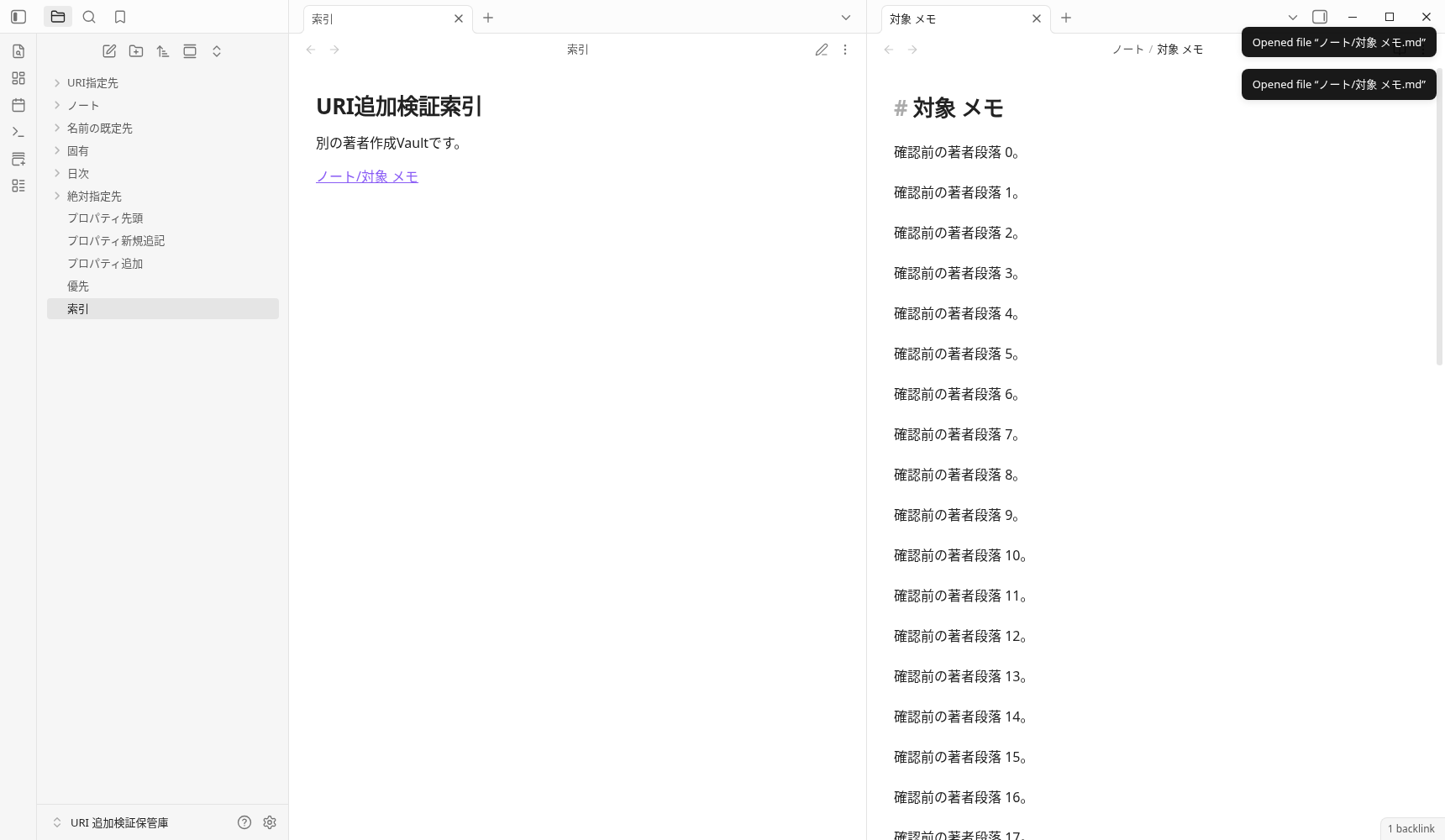
For open/new/daily/unique, we recorded the 12 inputs involving paneType=tab, split and window (S:P01〜P12). The official documentation marks window as desktop-only. We inspected the actual main tab, tab groups and separate pop-out windows, and saved screenshots. Because metadata for closed windows remains, success was not judged solely by the global leaf count.
x-success・x-error confirms receipt at the return address
The official explains that the return to x-success includes name (no extension), url (obsidian URI), and desktop file (file URI). It is different between the success of saving and the fact that the caller has received the return. S:X01/X02/X03 observed the storage of the note, but there was no reception in the author's localhost HTTP recipient. The prepared BROWSER adapter has not been executed, and the OS and caller handoff have not been confirmed.
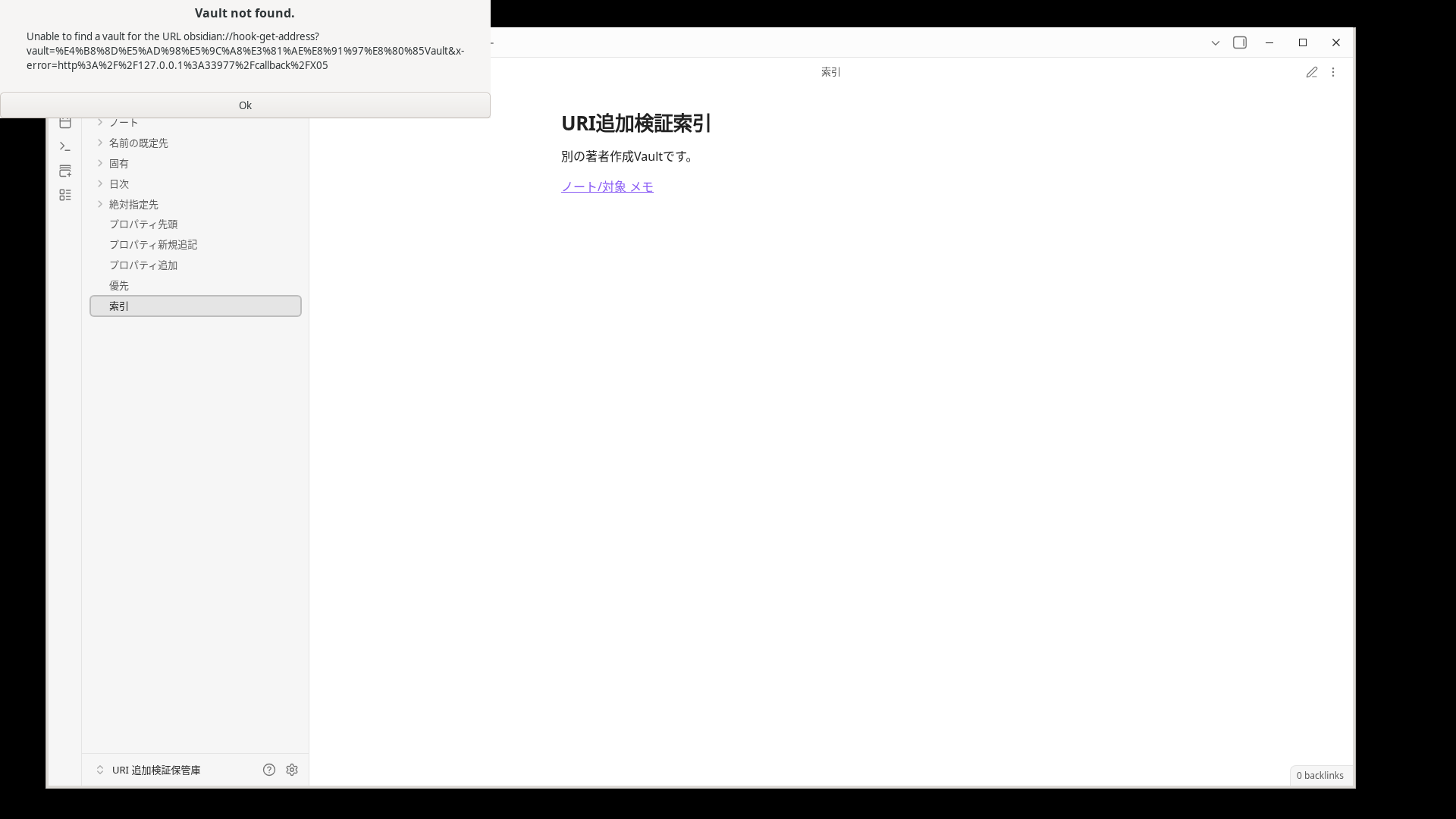
The official documentation states that hook-get-address for Hook returns to x-success when supplied; otherwise, it copies the current note’s Markdown link to the clipboard. In S:K01, the author’s clipboard sentinel remained unchanged, and S:X04 received no callback. Hook itself was not run. With the nonexistent Vault in S:X05, the actual “Vault not found” dialog appeared, but no x-error was received. We do not interpret an error dialog as callback success or as proof of a product defect affecting all callbacks.
38 input and actual results
38/38 is the number "There is an input record containing parameters for each action". It is not a number that means that "all the effects of the specification were successful". There is a shortage of additional flags for open, absolute path of new, destination of daily, contribution of both flags, and Hook/callback. I is the first 19, S is additional 37, and T is 2 with an effective block and no conflict path. Proceed to the original JSON from each ID.
| Item | Descript of the official | Actual results / Remaining shortcomings | Corresponding observations |
|---|---|---|---|
open.vaultInput record available | Vault name or 16 character ID. Fixed original text L54 | I:O1 is Vault name, I:O3 is 16 character ID is specified Vault. The ID is confirmed with this open input and does not expand to all ID combinations of other actions. | |
open.fileInput record available | Relative path from the name or root in Vault. .md can be omitted. Fixed original text L55 | I:O2 displayed a relative path containing Japanese characters and spaces; I:O3 displayed the note with .md. I:O5 navigated to a heading, and T:B1 to a valid block. The nonexistent file in I:O6 produced neither a notification nor a new file. | |
open.pathInput record available | The absolute path of the file system. If specified, it takes precedence over vault/file, and it is written that it looks for Vault that includes it. Fixed original text L56,57,58,59 | I:O4 displays existing notes with the absolute path in the registered author Vault. At the same time, the real path was used from the specified invalid vault/file. The result is separated from the path of the new creation. | |
open.prependInput record available | It is described that you will try to add it to the top and annex the property. The content of the text transport is not listed in the open section. Fixed original text L60 | The exploratory S:M02 displayed the target; its bytes were unchanged. Correct transport of the text was not verified, so this is classified as neither successful official behavior nor a defect. | |
open.appendInput record available | Add it to the end of the file and try to merge the property. The content of the text transport is not listed in the open section. Fixed original text L61 | The exploratory S:M01 displayed the target; its bytes were unchanged. There is no valid evidence of added text establishing the documented effect. The example that actually appended text used new+append. | |
open.paneTypeInput record available | tab=new tab, split=new group, window=popout (Desktop only). Fixed original text L62,63,64,65,66 | S:P01/P02/P03 displayed a new tab, a new tab group and a separate window with tab/split/window, respectively. The window result was recorded only on the Linux desktop. | |
new.vaultInput record available | Vault name or 16 character ID. Fixed original text L81 | Saving was observed for new inputs in I:N1〜N5 and S that included the author’s Vault name. S:N02, with a conflicting path, is a separate unsuccessful input. Not all combinations of 16-character IDs were tested with new. | |
new.nameInput record available | New note name. The storage destination is the Default location for new notes. Fixed original text L82 | I:N1 is created only with name, and I:N2 uses the simultaneous file specified destination. S:N01 is saved to the author folder of the pre-set Default location for new notes. | |
new.fileInput record available | Save destination and name from the Vault route. If specified, it takes precedence over name. Fixed original text L83 | I:N2 saved it to the creation destination from the Vault route and did not use the simultaneous name. I:N3/N5 is an additional/replacement of existing files. I haven't tried all the formats of parent folders that don't exist. | |
new.pathInput record available | The absolute path of the file system. If specified, it takes precedence over vault/file, and it is written that it looks for Vault that includes it. Fixed original text L84 | S:N02 did not reach the target in a test with conflicting inputs. In the separate T:P1 test, only path+content was supplied for a file that did not yet exist inside the registered, author-created Vault. It was still not created after 6 seconds. No successful case was observed. | |
new.paneTypeInput record available | tab=new tab, split=new group, window=popout (Desktop only). Fixed original text L85 | S:P04/P05/P06 observes the display of the new storage destination Markdown and tab/split/window respectively. | |
new.contentInput record available | Text to be saved. Symbols and line breaks of values are also encoded. Fixed original text L86 | The Japanese characters, symbols and line breaks in I:N1 matched the saved text. The unencoded # in I:W1 caused the latter part to be lost. T:P1 is a separate record: entering content did not create the destination file for path. | |
new.clipboardInput record available | Uses the clipboard text instead of content. Archived source L87 | S:C01 saves the author clipboard of the dedicated DISPLAY. S:C04 saves the clipboard text by specifying it at the same time as the content. This set of priority results does not guarantee all forms. | |
new.silentInput record available | Do not open the note you created. Fixed original text L88 | I:N4 maintained the display note while saving the new Markdown. Check whether it is saved or not and whether the screen will open separately. | |
new.appendInput record available | Specify to add the end when there is an existing file. Fixed original text L89 | I:N3 retained existing text and appended at the end. append+overwrite in S:N03 also appended text. S:M03 merged one set of author YAML with the body text. | |
new.overwriteInput record available | Replace the existing text if the append is not set. Fixed original text L90 | I:N5's overwrite alone replaces the existing text. S:N03 retained the existing text and added it with the append simultaneous specification, and did not use overwrite. | |
new.x-successInput record available | Return URI from the caller. The name/url/file output needs to be checked on the receiving side. Fixed original text L91 | We recorded the input and URI receipt, but received no callback at our own HTTP endpoint. The prepared BROWSER adapter did not run either. OS/caller handoff remains unverified; this does not establish universal callback failure. | |
daily.vaultInput record available | Vault name or 16 character ID. Fixed original text L104,81 | The first I:D1 run produced no Markdown. I:D2, a separate plan with a prepared save folder and indexing criteria, saved to the registered author’s daily note Vault. Do not attribute the result solely to the changed prerequisites. | |
daily.nameInput record available | New note name. The storage destination is the Default location for new notes. Fixed original text L104,82 | S:D01 is added to the set date note, not the specified name. | |
daily.fileInput record available | Save destination and name from the Vault route. If specified, it takes precedence over name. Fixed original text L104,83 | S:D02 is added to the set date note, not the specified file. | |
daily.pathInput record available | The absolute path of the file system. If specified, it takes precedence over vault/file, and it is written that it looks for Vault that includes it. Fixed original text L104,84 | S:D03 is added to the set date note, not the specified path. | |
daily.paneTypeInput record available | tab=new tab, split=new group, window=popout (Desktop only). Fixed original text L104,85 | S:P07/P08/P09 saves the text to the set daily order and displays tab/split/window respectively. | |
daily.contentInput record available | Text to be saved. Symbols and line breaks of values are also encoded. Fixed original text L104,86 | Multiple inputs in I:D2 and S saved text to the configured date file. The initial failure in I:D1 and the differing destinations in S:D01〜D03 remain separate records. | |
daily.clipboardInput record available | Uses the clipboard text instead of content. Archived source L104,87 | S:C02 adds the author clipboard text of the dedicated DISPLAY to the existing daily file. Physical iPhone and OS inter-OS clipboard have not been verified. | |
daily.silentInput record available | Do not open the note you created. Fixed original text L104,88 | S:D04 is saved as a daily file, and the actual display is maintained as an index. | |
daily.appendInput record available | Specify to add the end when there is an existing file. Fixed original text L104,89 | S:D05 retains the original text + adds with append + overwrite. Since the flagless daily is also added, the cause and effect of the append alone is not separated. | |
daily.overwriteInput record available | Replace the existing text if the append is not set. Fixed original text L104,90 | S:D05 is a simultaneous input of append+overwrite. The original text retention was observed, but the overwrite alone has not been tested. | |
daily.x-successInput record available | Return URI from the caller. The name/url/file output needs to be checked on the receiving side. Fixed original text L104,91 | We recorded the input and URI receipt, but received no callback at our own HTTP endpoint. The prepared BROWSER adapter did not run either. OS/caller handoff remains unverified; this does not establish universal callback failure. | |
unique.vaultInput record available | Vault name or 16 character ID. Fixed original text L119 | The first I:U1 run produced no Markdown. I:U2, a separate plan with the save folder prepared, and S created the uniquely named Markdown with author text Vault. | |
unique.paneTypeInput record available | tab=new tab, split=new group, window=popout (Desktop only). Fixed original text L120 | S:P10/P11/P12 observes the storage of the proper name Markdown and the display of tab/split/window. | |
unique.contentInput record available | Text to be saved. Symbols and line breaks of values are also encoded. Fixed original text L121 | Author text was saved in the uniquely named files from I:U2 and S. The first I:U1 run, which created no file, remains a separate record. | |
unique.clipboardInput record available | Uses the clipboard text instead of content. Archived source L122 | S:C03 saves the author clipboard of the dedicated DISPLAY to the unique name Markdown. | |
unique.x-successInput record available | Return URI from the caller. The name/url/file output needs to be checked on the receiving side. Fixed original text L123 | We recorded the input and URI receipt, but received no callback at our own HTTP endpoint. The prepared BROWSER adapter did not run either. OS/caller handoff remains unverified; this does not establish universal callback failure. | |
search.vaultInput record available | Vault name or 16 character ID. Fixed original text L138 | I:S1/S2 displays the search for the specified Vault, and S:S01 opens the search sidebar without query. | |
search.queryInput record available | search term. Open the search when omitting. Fixed original text L139 | I:S1 displayed a quoted search term that matched the author-created text. I:S2 displayed a nonexistent term and returned no matches. The full search syntax and every combination of special characters were not tested. | |
hook-get-address.vaultInput record available | Vault or 16 character ID. When omitted, the current/last focus is Vault. Fixed original text L159 | S:K01/S:X04 entered the author Vault, but there is no Hook output. S:X05's non-existent Vault is a real error dialog. Distinguish between name resolution and Hook collaboration success. | |
hook-get-address.x-successInput record available | Return URI from the caller. The name/url/file output needs to be checked on the receiving side. Fixed original text L160 | We recorded the input and URI receipt, but received no callback at our own HTTP endpoint. The prepared BROWSER adapter did not run either. OS/caller handoff remains unverified; this does not establish universal callback failure. | |
hook-get-address.x-errorInput record available | Hook section error return URI. The exact error ignition conditions are not stipulated in this text. Fixed original text L161 | We recorded the input and URI receipt, but received no callback at our own HTTP endpoint. The prepared BROWSER adapter did not run either. OS/caller handoff remains unverified; this does not establish universal callback failure. |
58 entries, results, view the original JSON JSON of 38 items · 58 JSON
Original, official source, confirmation method
The confirmation date is September 30, 2026 UTC. Using the officially distributed Obsidian AppImage1.13.7, using a Linux app deployed in an existing environment, both the app and the Installer were read as 1.13.7 on the actual General screen. Start the app URI reception with CLI, and the note standard selection and setting screen is an actual GUI operation. Auxiliary API is used for initial settings/layout and reading DOM, metadata, and saved status, and does not replace file creation/addition/block movement with API writing. The clipboard was prepared with API to assist only the author's text of the dedicated DISPLAY.
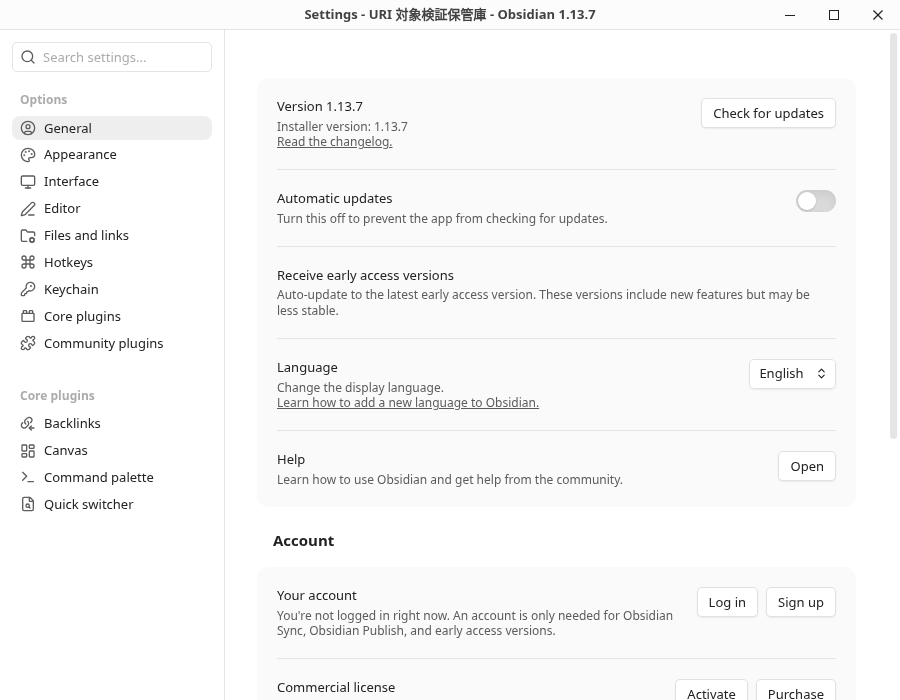
The text, screen, and JSON were saved without processing, and bytes/SHA256 were fixed in the receipt of each GUI verification. The first failure or invalid author samples have not been erased. The image and download of this article is a copy of the original byte. The OG image also uses the original PNG after the block move, and does not generate a fictional UI. After running, the own app/Xorg process records the termination 0 and confirms the release of DISPLAY78 and CDP9229 separately.
- Obsidian official URI original text (fixed commit) / acquired original text
- Official Internal links: Valid block ID / Original
- Official Properties original / Daily notes original / Unique note creator original
- I original 19 receipt / S additional 37 receipt / T target 2 receipt
The receipt above identifies the scope of the original private records. The selected files copied into this article do not constitute distribution of the entire archive. This verification does not evaluate search indexing, search traffic, synchronization, productivity, or the success of SimpleMemo features.
The original's matching range and verification conditions. The fixed 38 item is an input record, distinguishing between the finite effect observation of the 24 item and the lack of the 14 item.
Frequently Asked Questions
What is the difference between obsidian:// and the normal Web URL?
obsidian:// is a unique URI that Obsidian receives. It is not URL to get a web page. The association on the terminal side and the note operation after going to Obsidian are checked separately. The actual measurement of this article is after receiving the URI of the Linux app.
How do you write Japanese, spaces, and #?
URI-encode each value separately. A space becomes %20, # becomes %23, and / becomes %2F. Encode the # used for a heading or block reference within the file value as well. In our example with a raw # left in the content, everything from that # onward was not saved.
Do you use open to add to an existing note?
The confirmed example of the text postscript is passing file, content, append=true to new. There is also a description of append/prepend in the open section, but the content is not listed in the same section, and the text has not changed in the exploratory input of this verification.
Can I change the save destination if I pass the file or name to daily?
The archived official documentation states that daily accepts the same parameters as new. In our Linux test, however, the targets specified by name, file, and path were not created; the content was added to the date-based note configured in Daily notes. Check the actual settings and saved files to confirm the destination.
If I specify x-success, have you confirmed the return?
No. In new, daily, and unique, there are inputs that have been observed to be saved, but there was no receipt at the HTTP return destination I own. Receiving URI to the app or closing CLI 0 is not proof of return to the caller. Hook, OS handoff, and actual calling source app have not been confirmed.
Is the result the same with iPhone?
This article did not test a physical iPhone, iOS Shortcuts, or SimpleMemo. These results cover only an author-created Vault in Obsidian 1.13.7 for Linux. For symptoms specific to iPhone, consult the existing Shortcuts troubleshooting guide and verify the behavior on your device.
Proceed to the next according to the input at hand
specification, you can assemble the value with the URI generator and check the storage destination and text in a short note for work. If you stop at the startup stage, go to shortcut handling guide. If you want to select the entire input method to Obsidian, proceed to Obsidian configuration guide.