SIMPLE MEMO — iPHONE APP
A passing thought. Just say it.
The iPhone app that turns your voice into notes.
Delivered to your email and Obsidian.
Start for free · iPhone / Apple Watch

Simple Memo - for Obsidian is an email-yourself app for iPhone built for speed. In our benchmark of eight note apps it was the quickest to accept typing: 0.4 seconds after the tap (warm launch, iPhone 16e — how we measured). Then one tap sends the note to your inbox. Built as a Captio alternative after Captio shut down in October 2024. Also works as a LINE Keep replacement for text memos. Features fully on-device voice auto-input (iOS 26+), Obsidian integration (auto-appends sent memos to your notes), on-device AES-GCM encryption for the Outbox and send history, offline auto-resend via Outbox architecture, and no persistent server storage of your memo text (transit only during send). It also works on Apple Watch — dictate a memo on your wrist and send it; it lands in your inbox, and in your Obsidian vault too if Obsidian integration is enabled on your iPhone. A free update in July 2026 added AI auto-tagging: on-device AI (Apple Foundation Models) reads the note and adds a title of up to 20 characters, one to three tags, and a type (todo / idea / log), then appends it to Obsidian with those tags intact (once Obsidian integration is set up and AI Auto-Tagging is turned on). The tagging runs entirely on your iPhone and memos are never sent to an external server for it (devices without Apple Intelligence fall back to on-device lightweight formatting). Far simpler than Drafts, with a faster measured launch.
Concept What is Email Memo?
Email Memo is a new way to take notes — jot down your thought and send it to your own inbox with one tap. Email is somewhere you already check every day, so memos land where you will see them. No folders, no organizing — and with Obsidian set up and AI Auto-Tagging on, AI adds the tags for you. Learn how Note-to-Email works and catch your thoughts before they slip away.
App Preview Simple Means Fast

3 Steps How to Use
Features Key Features
One-Tap Send
Send instantly with a single tap the moment you have an idea.
0.4s launch (warm, iPhone 16e), one-tap send. A short path from thought to inbox.
Offline Support
Works without internet.
Auto-resends when back online.
History & Status
Check send history in-app.
Easily track pending memos.
Privacy First
On-device AES-GCM encryption for the Outbox and history.
Memo bodies are not persistently stored on our servers.
Quick Setup
Just set your destination email.
Ready to use in minutes.
Voice Input
Just speak to take a memo (iOS 26+, supported devices and languages). Fully on-device — no upload, no extra cost.
Optional auto-start on launch.
Obsidian Integration
Auto-appends sent memos to your Obsidian notes.
No plugin; once you pick the vault folder, no app switching.
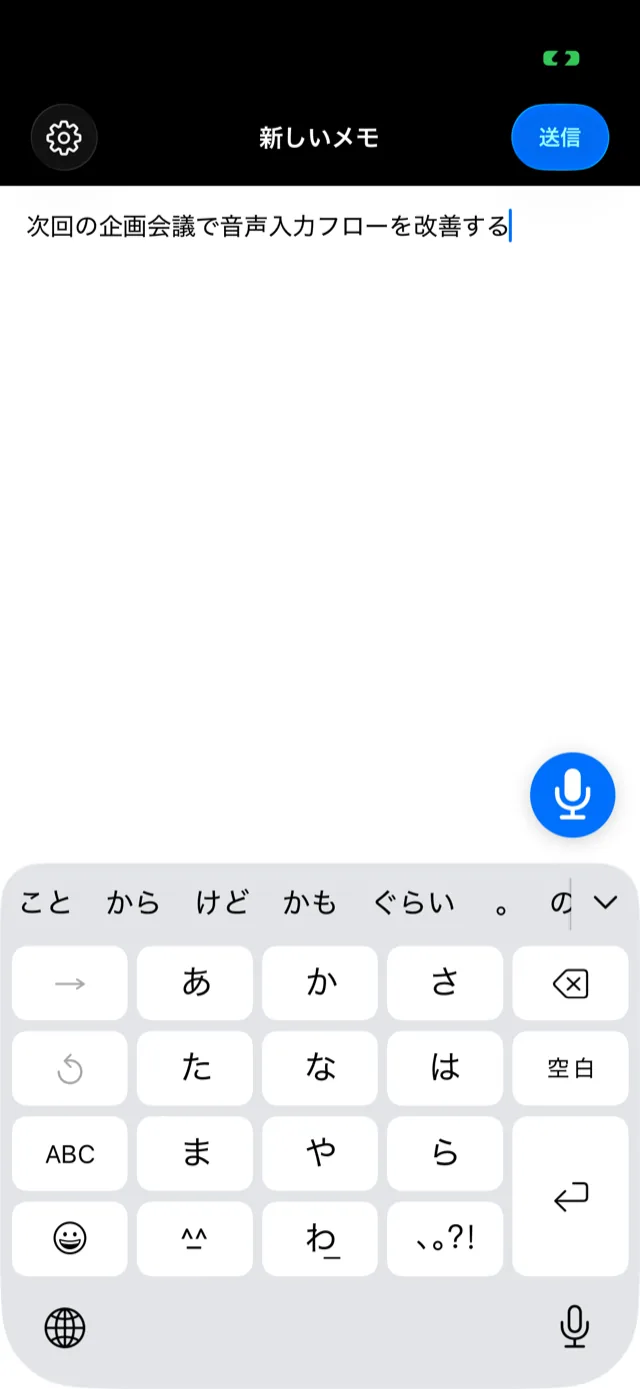
Just speak. It's a memo. Voice auto-input.
Tap the mic in the bottom-right, or auto-start on launch, then just speak — your voice becomes text and a memo on the spot. Powered by Apple's latest on-device speech recognition (iOS 26 or later, on supported devices and languages), so neither audio nor text leaves your device. Capture a thought even when your hands are full.
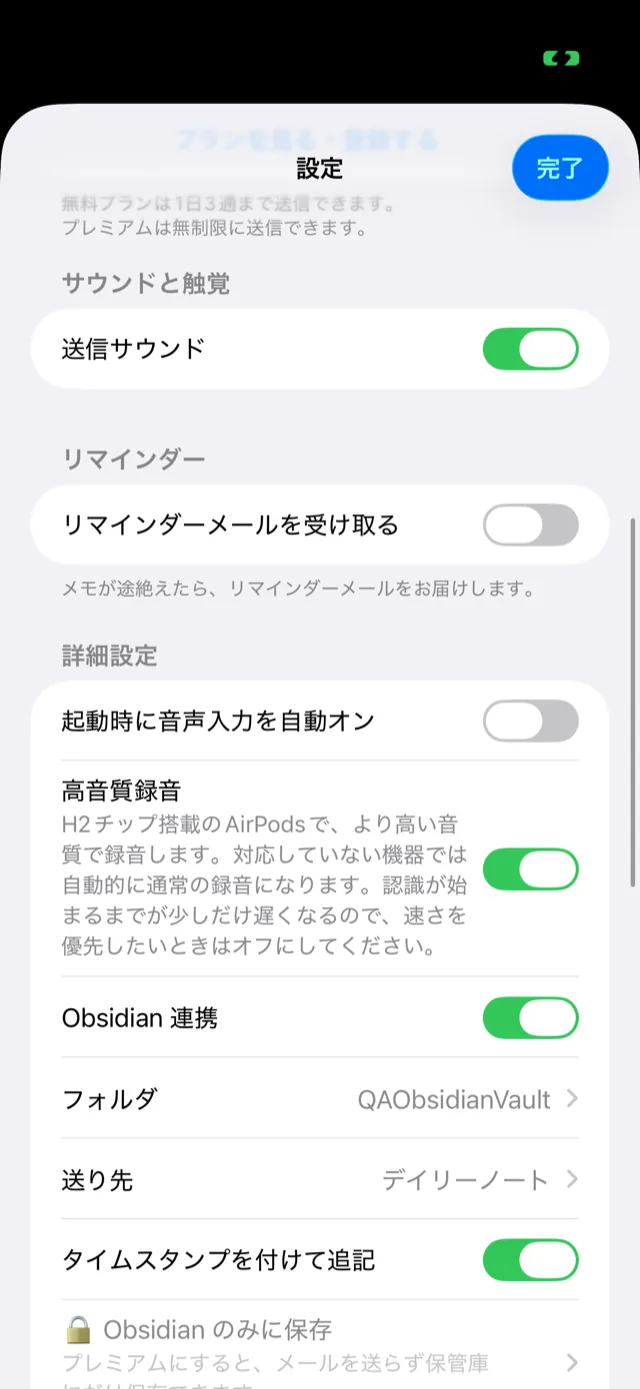
Your iPhone memos, automatically in Obsidian.
A memo you send with one tap is automatically appended to a note in your Obsidian vault — no plugin, and once you pick the vault folder, without opening Obsidian. Capture on iPhone, organize in Obsidian: a clean division of labor.
Comparison Simple Memo - for Obsidian vs Drafts — Quick Capture Compared
Drafts
- $1.99/mo (Drafts Pro, as of June 2026)
- Powerful automation & scripting
- Complex action system
- Multi-destination output
- Steeper learning curve
Simple Memo - for Obsidian
- $2.99/mo
- Pure speed: 0.4s launch (warm, iPhone 16e)
- One-tap send to your email
- On-device AES-GCM encryption
- Quick setup: enter and verify your email
If you want scripting and automation, choose Drafts. If you want to start typing sooner and send to email in one tap (ready to type 0.4s after the tap vs Drafts' 0.9s, its fastest of five runs, in our warm-launch benchmark), choose Simple Memo - for Obsidian.
Our Story Why We Built This
We were long-time Captio users. The ability to send a thought to your inbox with one tap — that simple experience was unlike any other memo app. But in October 2024, Captio shut down. We searched for an alternative with the same speed and simplicity, but nothing came close.
"If it doesn't exist, we'll build it ourselves." That decision launched this project. We reached a 0.4s launch (warm, iPhone 16e) and one-tap sends, built an Outbox that keeps notes sent while offline on the device and retries them, and designed a privacy-first system that does not persistently store your memos on our servers. Inspired by Captio's workflow and rebuilt with modern technology, we set out to make "note-to-email" as quick as we can.
Use Cases How People Use It
Capture ideas on the go
Launch in 0.4 seconds (warm, iPhone 16e), type your thought, tap send. It's sent to your inbox before you forget. No folders to choose — and with Obsidian set up and AI Auto-Tagging on, tags are added on device.
Shopping lists & reminders
Jot down grocery items, school reminders, or anything you don't want to forget. Your inbox becomes a simple to-do list you already check every day.
Captio alternative
Same "memo-to-email" experience as the discontinued Captio, plus an offline Outbox and on-device AES-GCM encryption for the Outbox and send history. See the full comparison →
Input is incredibly smooth
"The flow really matters when you use a notes app — your thinking gets tangled, or the next idea surfaces while you're still writing the last one. This app is genuinely smooth: a fresh blank screen appears the instant you tap Send, so I especially want people who've only ever used the iPhone's default apps to try it. It's rare to be able to keep thinking and outputting this actively without breaking your train of thought. And if you ever want to look back, you can search your history, which makes thinking flow even better. Being able to use it without any hesitation is really great."
— Japan App Store customer review (Current Japan App Store rating: ★4.1 · 27 ratings; review posted May–June 2026; translated from the original Japanese)
A delete button would be nice
"I use it every day — I can't live without it anymore! It would be even better if I could delete a mistyped memo with one tap!"
— Japan App Store customer review (Current Japan App Store rating: ★4.1 · 27 ratings; review posted July 2026; translated from the original Japanese)
Looking good
"It would be perfect with Action Button and Apple Watch support."
— Japan App Store customer review (Current Japan App Store rating: ★4.1 · 27 ratings; review posted June 2026; translated from the original Japanese)
✓ We heard you — we added Apple Watch support. See how it works →
Available on the App Store
Released February 2026 — Free to download

Plans Pricing Plans
Two simple plans
Free: up to 3 sends/day (no time limit) / Premium (monthly & yearly): unlimited sends
Price may vary by region. See the App Store for the latest price.
*Cooldown limits and server-side rate limits may apply to protect system stability.
Support FAQ
What is Simple Memo?
Simple Memo is a memo app focused on one thing: launch, write, send. Your memo is sent as an email to a pre-configured address with a single tap. There are no folders, sync settings, or complex features — and with AI Auto-Tagging turned on (Obsidian integration required), tagging happens on device instead of by hand.
What is AI auto-tagging?
Speak or type a note, and AI reads it and adds a title of up to 20 characters, one to three tags describing the content, and a type (todo / idea / log). It shipped as a free update in July 2026. It works once Obsidian integration is set up and AI Auto-Tagging is turned on in Settings (off by default); the note is then appended to your vault with those tags intact, and the email subject gets a short title too. Your original text is never rewritten. See AI auto-tagging for details.
Does AI tagging send my memos to an external server?
No. Tagging and title generation run on your iPhone using Apple's on-device AI (Apple Foundation Models), with no network calls for that step. On devices without Apple Intelligence, on-device lightweight formatting produces a title, tags and a type in the same format.
Can I send memos while offline?
Yes. When you send a memo offline, it's stored in the Outbox — encrypted with AES-GCM on your device. When connectivity is restored, pending memos are sent automatically (automatic retries have a limit; after that, you can resend from History).
Can I use Simple Memo for free?
Yes. The Free plan lets you send up to 3 memos per day, with no time limit — no credit card required, available from day one. If you want to send more, the Premium plan (monthly & yearly) unlocks unlimited sending.