Obsidian and Capacities
Where object-based PKM differs
This page was machine-translated from Japanese. Read the Japanese original
Books I'm about to read, people I've met, and ideas that came from them. Depending on whether you raise this as "your own file" or as a "notebook with types and attributes", the right tool will change. I operated the first demo of the Mac version, and the saving method was matched with the official document.
Read the textTable of contents of this page
Which do you choose, Obsidian or Capacities?
If you want to manage the location and format of the file yourself, Obsidian is a candidate, and Capacities is a candidate if you want to have the same attributes for each book or person. Obsidian also has properties, so you can't choose only "whether there are attributes". The axis of decision is whether to use the attribute design with your own group of notes or summarize it into an object type of the app. This is an organization based on Obsidian's property specification and Capacities's object type specification.
The following actual screen is the first demo before login of Capacities. I checked the input into the daily memo and the display of the sample book. It is not a review that has completed regular use, synchronization, or migration after account creation.
Comparison table: How to hold a notebook
| Axis of judgment | Obsidian | Capacities |
|---|---|---|
| Normal storage format | Markdown file in local storage | The app's own database. Markdown is an export format |
| Unit of information | Note properties and templates | Object types such as books and people and their properties |
| Edit outside the app | Note files can also be handled by another editor | First go through export |
| Synchronization with another terminal | Choose official Sync and file synchronization services | Including cloud synchronization. There are conditions for pre-downloading even for offline use |
| This confirmation method | Official help saving method and property specification | First demo operation of the Mac version of 1.70.2 + official materials |
Save and synchronization specification source: Obsidian — How Obsidian stores data, Capacities — Offline Support. The specifications of the table were confirmed on 2026 9 6.
The flow from the daily memo to the book confirmed in the Mac version demo
Obtained 1.70.2 for Apple Silicon from the official website and started it with macOS 26.4.1. If you proceed to "Get started" on the first screen, you will enter a demo that can be operated before registering an account.
- Enter 1 line in the dated note. We entered “Comparison note: keep the key points of a book I read” in the
Daily Note input field and checked its display. We did not select a destination folder at this stage. This confirms input in the demo; retention after restarting was not tested. - Open the main link of the demo.
When you open the "Deep Work" prepared on the next screen, a type of notebook called Book will be displayed. Backlinks from the daily memo were also displayed 1. It is not the result of verifying the function of automatically extracting the book, but the screen transition of the prepared sample. - See the attributes attached to the type.
Book has the Author, Rating, Recommended by, and Medium columns. On the screen where the demo fills in the author and evaluation, the "items you want to check about the book every time" is seen independently of the text. - See the connection of the link in the figure.
On the next demo screen, a diagram connected to the author, date, and tag centered on the book was displayed. After that, I went to the email and password registration screen, so I ended the operation there.
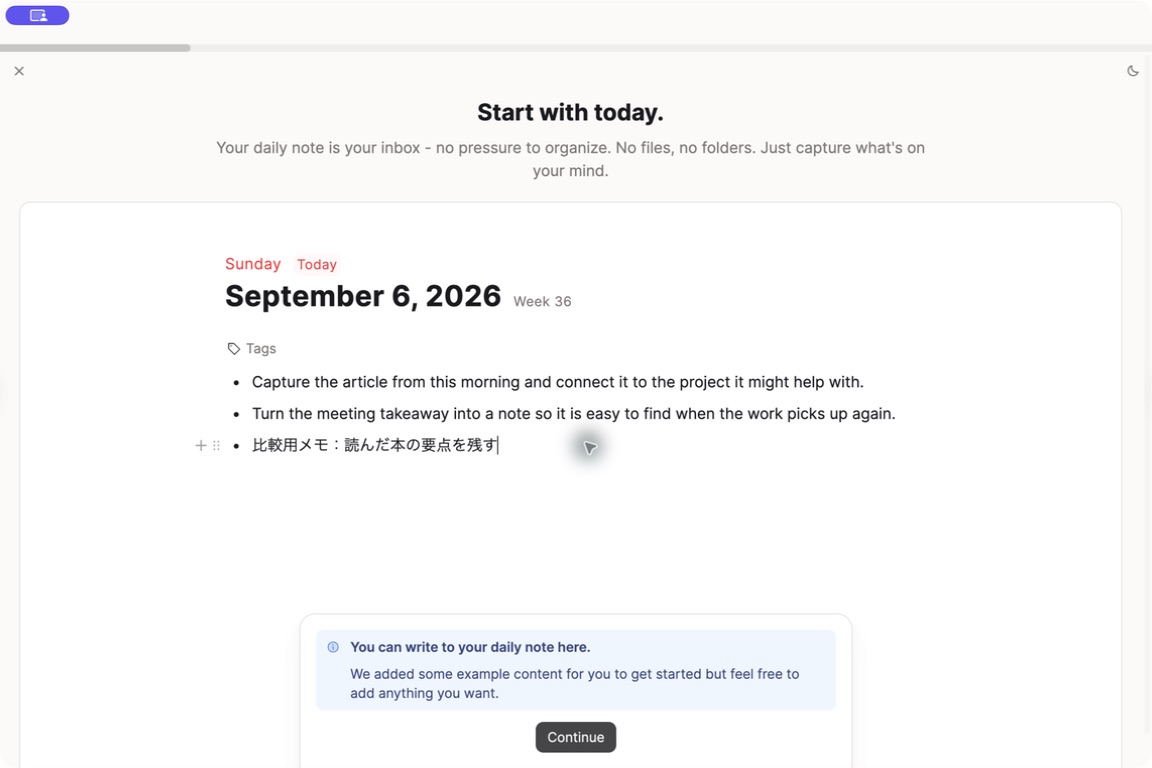
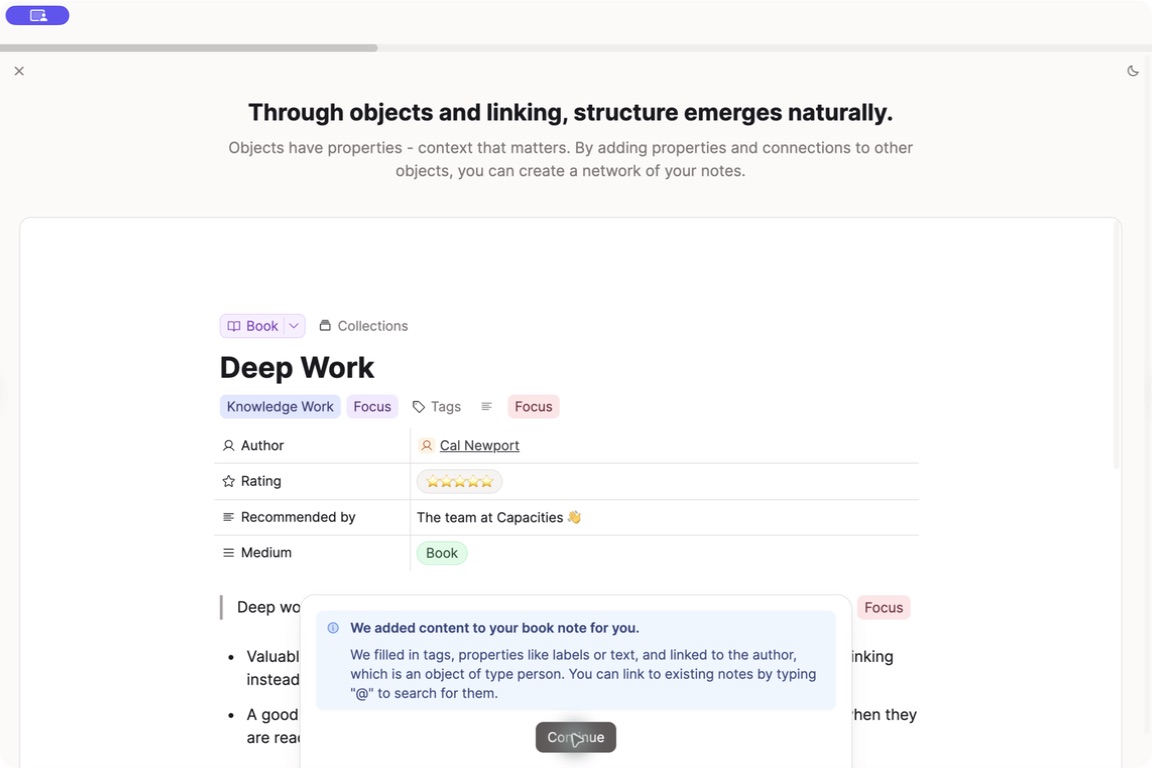
What can be read from here is not the superiority or inferiority of the input speed, but the way information is displayed. This type gives a perspective to those who want to align the author and evaluation every time they take a reading memo. On the other hand, if you want to write freely first and decide on items later, the work of setting up the mold itself may be a burden. This is an editorial judgment from the screen, not the result of a user survey.
Obsidian also has an attribute: the branch point is the place to put the design
Obsidian properties are retained as YAML at the beginning of the note. You can also include attributes in the template. For example, you can design your own reading notes such as the following. This is an explanatory description example, and it is not the result of running it in the app this time. Refer to official property specification.
---
type: book
author: "著者名"
rating: 4
---
# 読書メモ
次の仕事で試すことを一つ書く。
In Capacities, properties define the fields an object type can contain. The official documentation also describes Object Select, which selects notes of a specified type. You can choose whether to record a person as text or link to a note about that person, which may suit following an author’s other work from reading notes. This explanation is based on the Capacities property specification; we did not test creating custom types.
Offline support is different from having a normal file
In the official description of Capacities, after downloading the note to the terminal, it can be edited offline and synchronized when returning to online. However, full-text search and AI cannot be used, and images, etc. depend on the acquisition status of the terminal. The normal storage destination is its own database, and it is not in the form of directly opening the same folder as the Obsidian repository and co-editing. Based on Offline Support.
If you often use it on the go, it will be easier to determine whether "the necessary notes have been acquired to the terminal" and "search and attachments are also necessary" at the time of introduction. This time, we have not conducted an experiment to block the line, reconnect, or resolve the competition.
If you are thinking about migration, check from a small amount of output
The official export guide says that attributes are exported as front matter, collections as CSV and links between notes as local links. Automatic export requires a destination and an active schedule, and the app must be open at the scheduled time. This was checked against Exports and Backups.
In the actual migration, it is a good idea to prepare a small number of books, people, and daily notes, and check whether the text, links, attributes, and images can be read in the exported file before adding more targets. This article does not export or import to Obsidian. It is not possible to determine that all displays and operations will be the same with the migration destination based on the specification that can be exported.
The fee is after trying the necessary functions for free
In the official price list of Capacities confirmed on September 6, 2026, Basic is free and includes custom object type, inter-terminal synchronization, import and export. The media is up to 5GB in total, and the subsequent upload is a separate frame of 100MB per month. The latest conditions, including paid functions and billing cycles, can be found in official price list.
The first thing to choose is management rather than plan. When you continue to make the same reading notes, compare whether it is easier to write if you have the attributes, or whether it is easier to look back if you develop your own file structure. The price-only comparison is Obsidian's price guide, and the file-centered alternative candidate is Obsidian and Logseq comparison.
Frequently Asked Questions
Which should I choose, Obsidian or Capacities?
Can Capacities edit the Markdown file as it is?
Can Capacities be used offline?
Can I create types of books and characters for free?
Verification environment and range
Actual machine confirmation: September 6, 2026, Apple Silicon's Mac/macOS 26.4.1/Capacities 1.70.2. In the first demo before logging in, which was started from the official distribution file, I checked the Japanese input into the daily memo, book samples, attributes, backlinks, and link diagrams. The posted image is the actual screen.
Confirmation based on official documents: Both apps' storage method, properties, Capacities's offline conditions, export, and free plan. Unverified: Continued saving after account creation, custom type creation, actual synchronization, export, migration, operation and performance of the iOS version, direct linkage from SimpleMemo to Capacities. These operations cannot be guaranteed from this result.
This is not an article in partnership with the comparison target. This site is operated by YURIKA, K.K., and information about the independent app "SimpleMemo" is also posted.