In ObsidianKeep a journalWrite short dated notes and revisit them
This page was machine-translated from Japanese. Read the Japanese original
First of all, line 1 what you want to leave today in the date note. You can start by adding "things to do tomorrow" and "things you want to remember" at night. Here, I will introduce a shape that can be used by hand and a specific example of rereading records.
Read the textTable of contents of this page
What should I prepare to write a diary with Obsidian?
You can prepare 1 dates in the storage room and leave the events of the day in bullet points in the form. There is no need to add tags and plug-ins from the beginning. If you haven't created a vault yet, see How to get started with Obsidian first.
The official Daily notes documentation describes opening today’s note and creating it if it does not exist. The default filename uses the YYYY-MM-DD format. This confirms the documented behavior; it is not a record of operating the settings screen on this Mac.
The following is a fictional completed example for the daily note dated 2026-9-14. You can add times only to entries whose sequence you want to check later.
# 2026-09-14

## 記録
- 09:15 散歩の途中で、来週の発表の導入を思いついた。
- 18:40 下書きを開いた。最初の一段落だけ直した。

## 1日の終わりに
- 明日やることを1つ:導入を声に出して読み直す。
- 覚えておきたいことを1つ:短く始めると下書きに戻りやすかった。
You are free to write long on the day you can write. However, if it is a burden to promise to fill in all the columns every time, reduce it to "record" only. This is an operational option, and it is not a guarantee that everyone will continue.
Try the existing manual template as it is
Save Japanese manual template (Markdown). The original text distributed on this site is the following short text. If you can't save the link, you can copy this content and use it.
# YYYY-MM-DD

## 記録

- HH:mm この例を、残したいことに置き換える。

## 1日の終わりに

- 明日やることを1つ:
- 覚えておきたいことを1つ:
If you want to start by hand, Create a new notebook with the date name in the storage room you want to use, and paste the template text above. Even if you don't know how to transfer the downloaded file, you can try this method to fill in the example.
You can check how to write headings, bullet points, check fields, and internal links in the standard Markdown and Obsidian extended notation real-screen correspondence table.
- Prepare a copy of the template for the day's record. Leave the original shape.
- Replace the file name and the date of the heading, for example, with
2026-09-14. - Replace the example sentence with
HH:mmwith your own time and record. If you don't need a time, cut that part. - After saving, open the note in your own Obsidian and check the destination vault, date and text.
YYYY-MM-DD and HH:mm are just characters in this file. It will not change to today's date or automatically enter the vault just by downloading it. The procedure here is a guide for readers to check, and this time, the import into the storage is not performed.
If you want an example of changing the date or check field, you can also use the existing Markdown template tool. I will check separately whether I can save the file there and whether I can import it into my storage. Before trying your personal record, check the flow with a short fictional example.
3 If you look back on the day, separate the event from the next action
If the number of diaries increases, instead of rewriting everything, there is a way to open the most recent notebook and pick up the same topic. The following table is also a fictional entry example. 3 days is a length for description and does not indicate the duration of effectiveness.
| Date | Residual records | Handling when looking back |
|---|---|---|
| September 14 | I came up with the idea of introducing the presentation | Leave it as a plan that has not yet been tried |
| September 15 | The beginning was long when I said it out loud | Distinguish as actually trying |
| September 16 | The introduction has come to an end | Next, make sure it will be conveyed to the other party |
In this example, by dividing "I came up with" and "I tried", you can choose 1 to do what to do next. If you leave the original text in the notebook of the day and summarize it briefly at the end of the day you look back, you can return to the original record when you change your interpretation later.
If the same topic comes up many times and you want to think about it in another note, you have the option to create a summary at that time. Even if you don't classify everything from the beginning, you can go back to the date first.
Days when you can't write, days when it gets longer, days when you can't find it
- The day you couldn't write: You can choose to fill in the blank or resume it from the next day. If you write it later, it will be difficult to read it by separating the date of the event and the date of entry, such as "September 16 date".
- The day the diary becomes longer: There is a way to put "what you want to remember" at the end of a long text 1 line. There is no need to shorten the full text.
- Day when the note cannot be found: Check the open vault, the date of the file name, and the destination folder in order. External additions and date deviations are handled in daily note addition problems.
- The day it does not appear on another terminal: Check the saving and synchronization separately. For operation on multiple terminals, go to comparison of synchronization methods. The synchronization setting does not complete only with the template in this article.
On days when you don't want to look back, you can just use a record of events. If you want to continue using Obsidian as a place to keep records, please decide according to your own burden.
When proceeding to the automatic template, distinguish the variables
The manual template and the Obsidian insert value template are different. In the formula Templates description, variables with curly braces such as {{date}} and {{time}} are guided.
The template specification for Daily notes is a setting for the body when creating a new date note. Don't think that it will be applied uniformly to the diary that already exists later. At the stage when you want to automate it, please read the official documents above and try it with your own settings.
If you proceed with Templater's <% … %> notation, Templater's execution example and daily note settings are covered in a separate article.
The actual screen left on the date Markdown and its limits
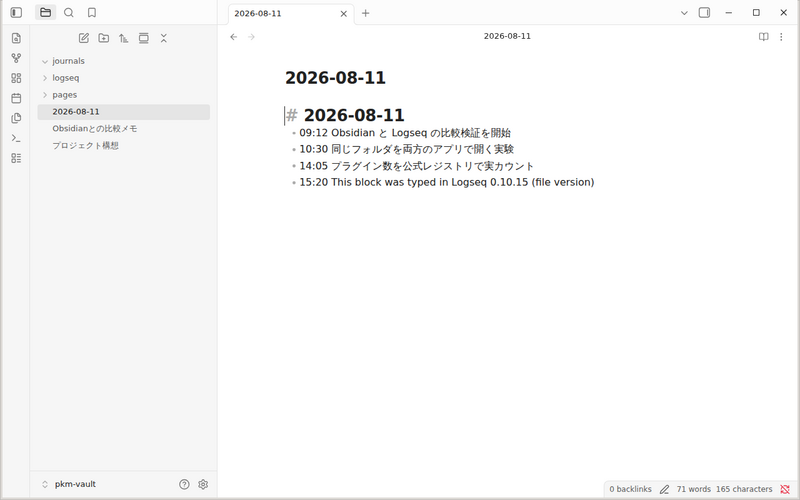
Comparison verification of the original Obsidian and Logseq, we confirmed the round-trip writing to Markdown on the same date. The original change record is PR #470. This screen shows that a short record in the verification environment at that time remained in the date notes of 1.
This article connects that format to an example of manual journaling. It does not demonstrate importing on a current Mac or iPhone, synchronization, automatic template application, or an effect on sustaining a journaling habit.
- Confirmation of past actual operation: August 11, 2026 date Markdown round trip in the Linux version. Reconfirm the image and the original public record.
- Confirmation of the original and distribution this time: Correlate the acquisition contents of the original Git of the manual template and the public URL. The example of the string is not replaced with an automatic variable.
- Official document confirmation: Check the role and variable notation of Daily notes and Templates.
- Unverified: Current storage capture, setting, terminal synchronization, continuity rate, psychological effect. The new functions and speeds of the SimpleMemo are not measured either.
Choose and separate the diary left in the email and the diary of Obsidian
The center of this article is to open the date note in the Obsidian and look back with a short record. If you want to place an email as a diary, please proceed to 1 line diary to email, and if you want to think about what to write, please proceed to journaling export example.
To send notes captured on the go to Obsidian, see the integration and destination settings for SimpleMemo. If you work entirely within Obsidian, you do not need another app to follow this article.
This site is operated by YURIKA, K.K. and introduces the independent app "SimpleMemo". This is not an official article by Obsidian.