Use Templater
Run templates and set up daily notes
This page was machine-translated from Japanese. Read the Japanese original
Templater is a plugin that evaluates variables and functions in a note and inserts the results into the text. Start by inserting 1 template by hand, then move on to the setting that runs it when a daily note is created. Using the same template, we checked what the note looks like when variables stay unexpanded and the result after the setting is applied.
Prepare the Templater and distinguish the notation
The official installation guide says to search for “Templater” in Obsidian Community plugins and install it. In this test, we placed the official 2.25.1 release files in an isolated Vault and enabled the plugin in Settings. If your Obsidian or Templater version differs, check the screen names and behavior in your own environment.
In Templater's Template folder location, this example uses Templates. Commands start with <% and end with %>. tp.file.title is the title of the target note, and tp.date.now("YYYY-MM-DD HH:mm") is an example that uses the date and time when the template runs. Do not confuse these with a journaling template where you write the date by hand, or with the {{date}} syntax of core Templates.
If you want to check the replacement and saving results of the title and date and time of the core templates, please also refer to Markdown template collection that actually inserts and re-displays all 10 types.
First, insert the template into the current note
The original text of Templates/Simple.md used for verification is as follows. The English memo part is a fictional content for verification that does not include personal information.
# <% tp.file.title %>

created: <% tp.date.now("YYYY-MM-DD HH:mm") %>
result: templater-simple-expanded

## Capture
- Sample thought from isolated verification.
- Prepare
Templates/Simple.mdand open the note you want to insert it into. - In the command palette, select Templater: Open insert template modal, then choose
Simplefrom the list. - Check the inserted heading and date. In this
Normalnote,tp.file.titleexpanded toNormal, and the time expression expanded to2026-09-30 10:46.
result: templater-simple-expanded is a fixed character in the original text. The fact that this line is visible is not used to determine success. Check if <% … %> has been replaced with the actual value. The date and time are UTC in this Linux environment, and 19:46 in Japan time.
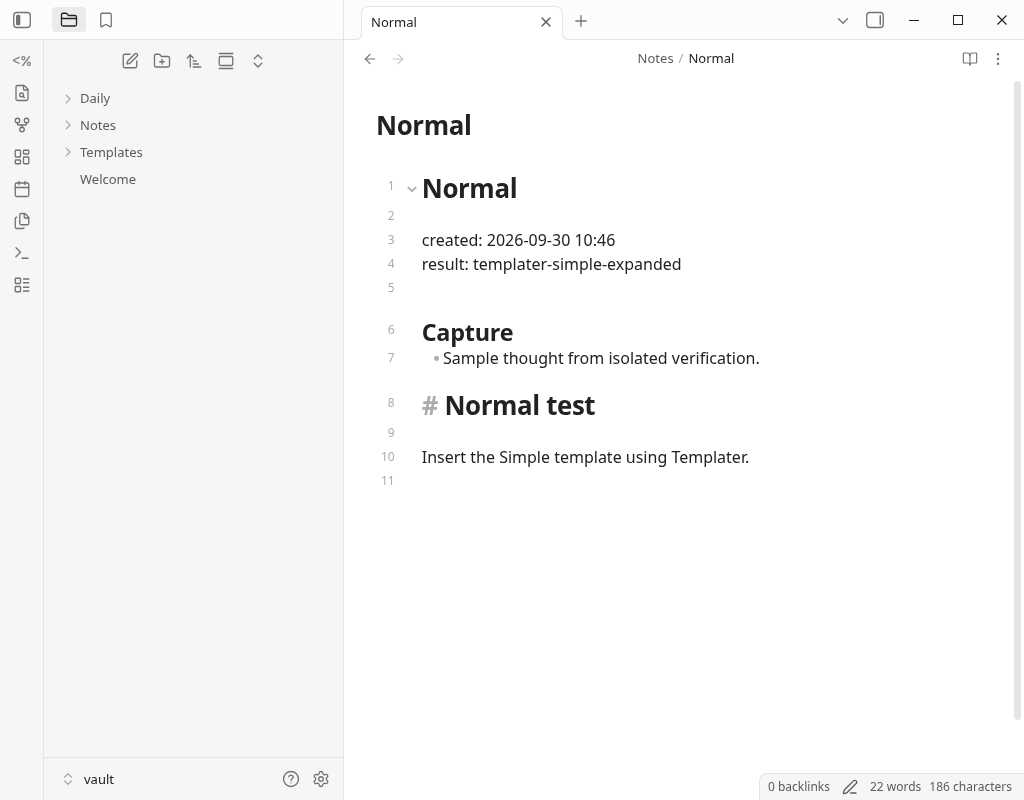
Replace templates in the active file, which expands Templater commands already pasted into the note, is a separate operation. A recovery example for daily notes appears in a later section.
Run Templater in the new daily note
First, I tried to configure the core Daily notes to include the template body and handle the Templater command in the body. The Templates/Daily.md used is the following original text.
# Daily <% tp.date.now("YYYY-MM-DD") %>

note-title: <% tp.file.title %>
result: templater-daily-expanded

## Inbox
- Sample daily capture.
These are the settings used in this test. Check the core Daily notes settings and the Templater settings separately.
| Where to set | Items displayed | This time's value |
|---|---|---|
| core Daily notes | Date format | YYYY-MM-DD |
| core Daily notes | New file location | Daily |
| core Daily notes | Template file location | Templates/Daily.md |
| Templater | Template folder location | Templates |
| Templater | Trigger Templater on new file creation | Compare OFF and ON |
| Templater | Template matching mode | None |
This settings screen shows Trigger enabled and Template matching mode set to None. None does not automatically assign a template, but it processes Templater commands already present in a new note’s body. In this example, Daily notes specifies the template, so we did not add Folder templates or File regex templates.
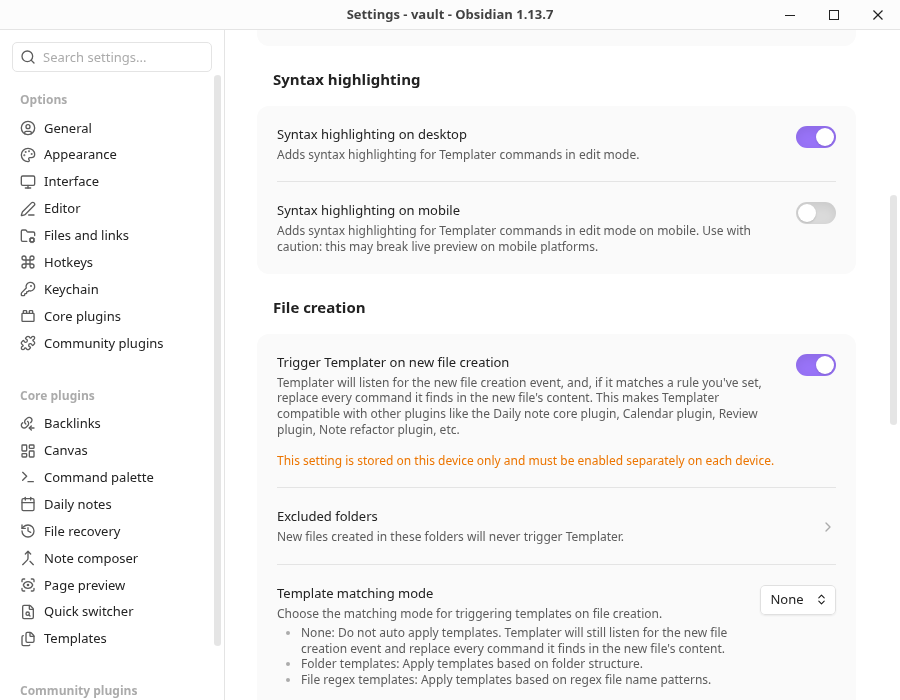
I compared the newly made notes with the same template, date format, and Daily/2026-09-30.md.
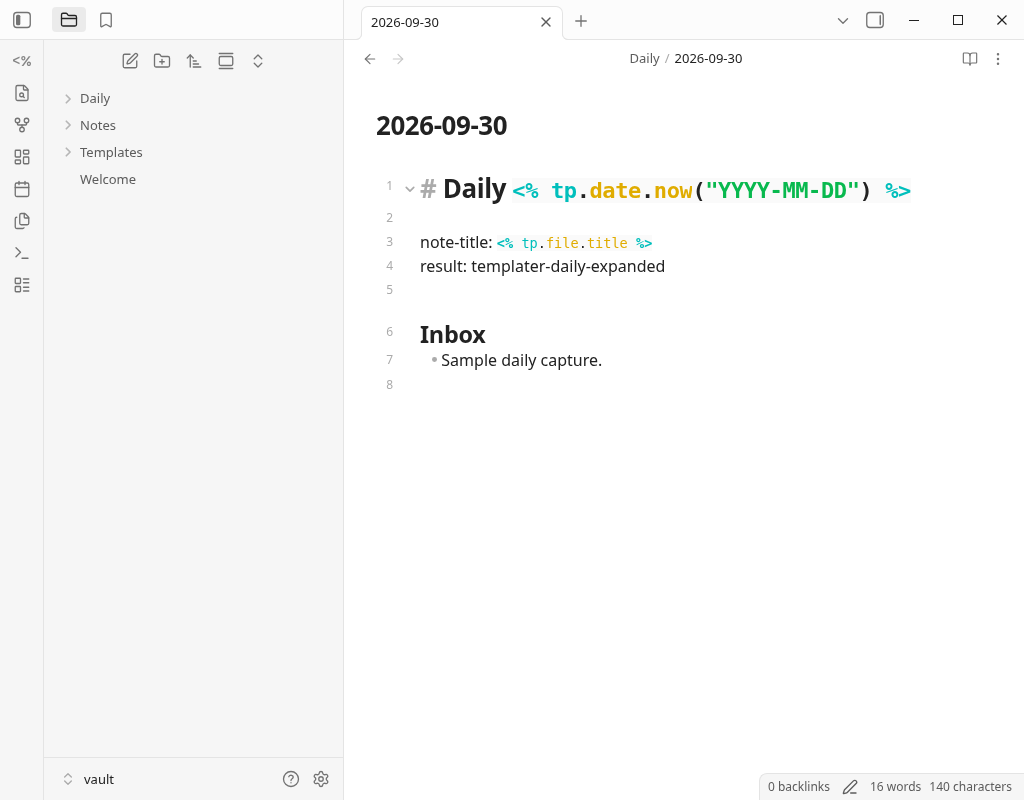
Trigger OFF: the expressions stayed unexpanded
# Daily <% tp.date.now("YYYY-MM-DD") %>

note-title: <% tp.file.title %>
result: templater-daily-expanded

## Inbox
- Sample daily capture.
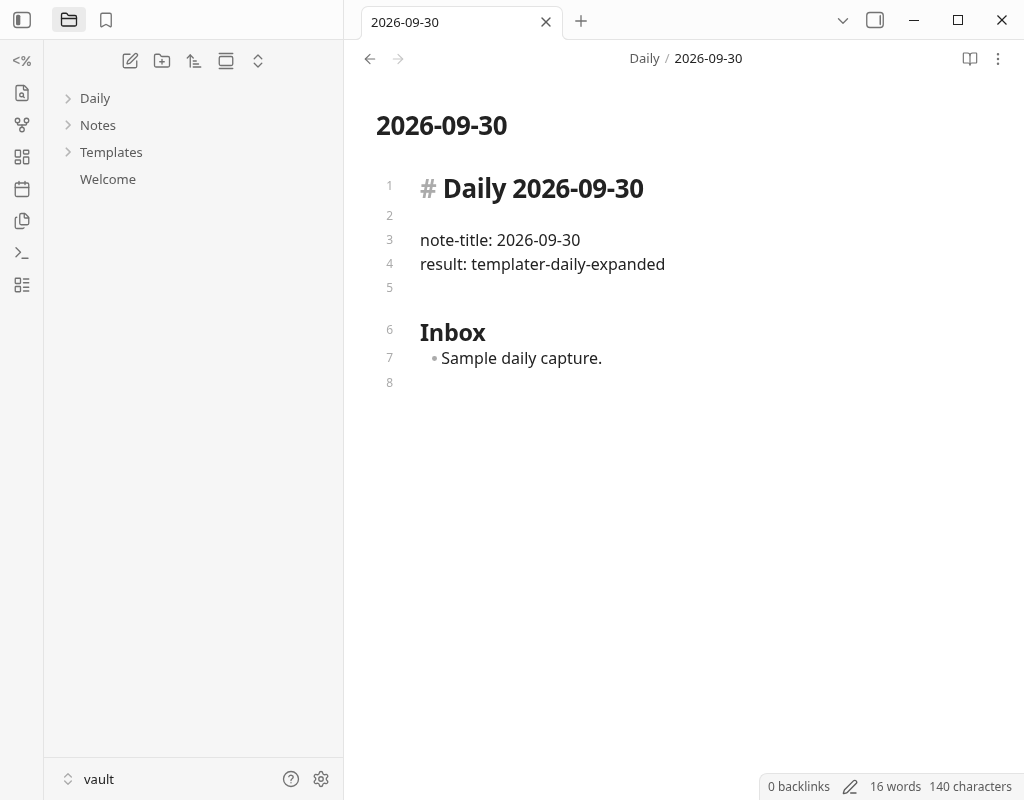
Trigger ON + None: expanded to values
# Daily 2026-09-30

note-title: 2026-09-30
result: templater-daily-expanded

## Inbox
- Sample daily capture.
Here too, result: templater-daily-expanded is fixed text present in both. The difference is that tp.date.now in the heading and tp.file.title in note-title were replaced with values.
What to check when the template does not apply?
Distinguish a note whose text was not inserted at all from a note where only the Templater expressions remain. In this OFF note, the text itself was inserted. After we turned Trigger ON and reopened the same existing note with the Daily notes command, the SHA256 of the saved content was identical before and after, and the expressions remained.
Run Templater: Replace templates in the active file with the existing note open, and I was able to expand the date and title expression. In the notes containing the record, check the contents and the code of the template, try it with a copy, and then operate. This is the result of this condition. It has not been generalized to other routes, such as the setting to open the Daily note at startup.
| visible state | Items to check | Evidence and scope |
|---|---|---|
| Expressions remain in the note | On/OFF of Trigger, whether to create a new or an existing note | This OFF/ON comparison, reopening existing notes, confirmation with manual Replace |
| There is no text of the template | Template file location of Daily notes | None does not choose a template automatically. Also check the setting of the plugin that inserts the template text |
| Does not work in a specific folder | Excluded folders, the original folder of the template | Specifications of the official 2.25.1. The excluded folder and template source will be excluded from the processing target at the time of new creation. This case itself has not been measured |
| The setting does not work on another device | The Trigger setting on that device | The settings screen notes that this setting is saved per device. Behavior on other devices and sync were not tested this time |
| The note to append to is missing or wrong | Date, destination folder, path to create the file | See troubleshooting for appending to existing daily notes. Check this separately from Templater expansion |
Templater settings alone do not cover accepting input from outside, appending from another app, or syncing between devices. This article checked template processing inside Obsidian.
Frequently Asked Questions
If I save the Templater template, will it be executed automatically?
Do I also need Folder templates in Daily Note?
If I turn on the Trigger, will the existing daily note be fixed?
Can I use the same procedure on iPhone?
Verification environment and the scope of use for this article
- Hands-on test: an isolated Vault on Linux, Obsidian 1.13.7 and Templater 2.25.1. We operated the settings screen and checked note creation and expansion with the commands registered in the app. For manual insertion, we chose the template from the list in the GUI.
- Daily note comparison:September 30, 2026 10:49~10:50 UTC (19:49~19:50 JST). Compare OFF and ON+None saving Markdown with the same template, storage destination, and date format. We also confirmed the reopening of the existing OFF note and the restoration by explicit Replace.
- Official original: Check the distribution file, manifest, and official docs/source of 2.25.1. The minimum Obsidian version of manifest is 1.13.0. This is not a guarantee of the operation of all versions and terminals.
- Unverified: iPhone/Android/Mac, Obsidian closed state and external file creation, daily note at startup, synchronization, SimpleMemo linkage, speed, audio quality, Siri, Watch.
This Linux desktop operation is not confirmed on the iOS Simulator or iPhone actual machine. It is described as a result of actual operation only to the extent indicated by the fictional memo and saved Markdown shown in the image.
Verification record, original and confirmation range
Official materials
- How to install Templater — Official 2.25.1 original
- Settings: Trigger, None, Excluded Folder — Official 2.25.1 Original
- Notation: Command and Date Function — Official 2.25.1 Original
- README: Notes on function and code execution — Official 2.25.1 original
- 2.25.1 manifest — Official 2.25.1 original
This site is operated by YURIKA, K.K. and introduces the independent app "SimpleMemo". This is not an official article by Obsidian.